- Home Page /
- Electronics /
- Computer Accessories /
- Computer & Tablets /
- Laptops /
- Traditional Laptops /
- Dell Chromebook 11, Intel Celeron-N2840 Proc,...
0 ratings

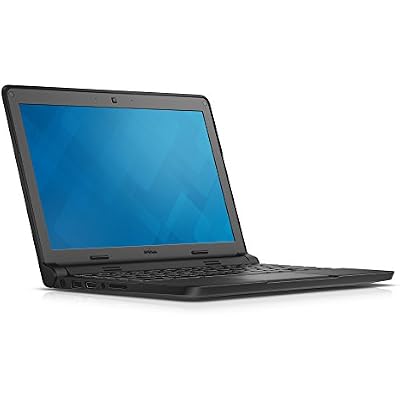
Dell Chromebook 11, Intel Celeron-N2840 Proc, 4GB RAM DDR3L Memory, 16GB eMMC SSD Storage, Chrome OS, Black
0 ratings
Write a review
Out of stock
 Imported from USA store
Secured transaction
Ubuy works hard to protect your security and privacy. Our advanced payment security system ensures confidentiality by encrypting your information during transmission using AES (Advanced Encryption Standards) and SSL (Secure Socket Layer) protocols. Your payment details are 100% secure as we do not share your payment details with third party sellers.
Our Top Logistics Partners


Stay ahead of the curve with the Dell Chromebook 11

Fast
Shipping

Free
Return*

Secure Packaging

100% Original Products

PCI DSS Compliance

ISO 27001 Certified


What Stands Out
Compact Design
The Dell Chromebook 11 features a lightweight, portable design, making it ideal for students and on-the-go professionals who need a reliable device that fits easily in bags.
Impressive Performance
Equipped with an Intel Celeron N2840 processor and 4GB of RAM, this Chromebook delivers smooth multitasking and efficient performance for everyday tasks like browsing, streaming, and document editing.
User-Friendly OS
Running on Chrome OS, this device offers a seamless, intuitive experience with automatic updates and access to thousands of apps, ensuring users stay productive and secure with ease.
Product Details
| Item Weight | 3.3 lbs (1.5 kg) |
Who Should Buy?

-
Students
Ideal for students needing an affordable, lightweight laptop for web browsing and homework applications.
-
Casual Users
Great for casual users who primarily browse the web, check email, and use cloud-based applications.
-
Budget-Conscious Buyers
Perfect for those looking for a cost-effective solution without demanding high-performance specifications.

-
Gamers
Not suitable for gamers due to limited processing power and lack of support for high-performance games.
-
Power Users
Not recommended for users who require extensive multitasking or heavy software applications, like video editing.
-
Business Professionals
May not meet the needs of business professionals who require robust software and extensive storage capacity.
Product Description
Dell Chromebook 11, Intel Celeron-N2840 Proc, 4GB RAM DDR3L Memory, 16GB eMMC SSD Storage, Chrome OS, Black
Have any Query? Chat with us
Customer Questions & Answers
-
Question:
What are the key specifications of the Dell Chromebook 11?
Answer: The Dell Chromebook 11 features an Intel Celeron N2840 processor, ensuring smooth performance for everyday tasks. With 4GB of DDR3L RAM and 16GB eMMC SSD storage, it effectively handles web browsing, streaming, and productivity applications. The compact design and Chrome OS offer an intuitive user experience, ideal for students and professionals who need a lightweight device for both work and leisure. -
Question:
Is the Dell Chromebook 11 suitable for gaming?
Answer: While the Dell Chromebook 11 is not built for high-end gaming, it can support lightweight, browser-based games and Android applications available on the Google Play Store. It's perfect for casual gaming experiences and educational applications, making it a good choice for students who enjoy simple game applications during their downtime. -
Question:
What browsers are supported on the Dell Chromebook 11?
Answer: The Dell Chromebook 11 primarily runs Google Chrome, providing fast and efficient browsing capabilities. Since it's built on Chrome OS, you also have access to a range of additional browsers available on the Google Play Store. This flexibility allows users to choose their preferred browsing experience, whether for school research, entertainment, or general web surfing. -
Question:
Can I use Microsoft Office on the Dell Chromebook 11?
Answer: Yes, you can use Microsoft Office on the Dell Chromebook 11 through cloud-based applications like Office Online. Furthermore, the Chromebook supports Android versions of Office apps, allowing seamless access to Word, Excel, and PowerPoint. This is useful for students and professionals who need to create and edit documents on-the-go, leveraging the convenience of cloud technology. -
Question:
What is the battery life of the Dell Chromebook 11?
Answer: The Dell Chromebook 11 offers an impressive battery life, typically lasting up to 10 hours on a full charge. This extended battery performance is ideal for students or professionals who need to work throughout the day without worrying about finding a power outlet. It's particularly suited for classrooms or meetings where continuous usage is required. -
Question:
How does the Dell Chromebook 11 handle multitasking?
Answer: Equipped with 4GB of RAM, the Dell Chromebook 11 handles multitasking efficiently for typical activities like browsing, streaming, and document editing. While it may not support heavy multitasking found in higher-end laptops, it performs well for light tasks, such as running multiple tabs or apps simultaneously without significant slowdowns. Perfect for students juggling between research and coursework. -
Question:
What type of connectivity options does the Dell Chromebook 11 offer?
Answer: The Dell Chromebook 11 provides ample connectivity options, including Wi-Fi and Bluetooth capabilities, enabling you to connect to various devices and networks. It has USB ports for peripherals, an HDMI port for external displays, and an SD card slot for additional storage. This versatility is ideal for users needing to connect to projectors for presentations or additional storage for media files. -
Question:
Is the Dell Chromebook 11 suitable for children or students?
Answer: Yes, the Dell Chromebook 11 is an excellent choice for children or students due to its robust build quality and user-friendly interface. Its lightweight design makes it easy for younger users to handle, and the Chrome OS environment is perfect for educational purposes, offering access to educational apps and tools. Educational institutions often incorporate this Chromebook into their curriculum, making it a reliable option for daily use. -
Question:
What operating system does the Dell Chromebook 11 run on?
Answer: The Dell Chromebook 11 runs on Chrome OS, a lightweight operating system designed primarily for web-based applications. This makes it responsive and simple to use, emphasizing speed and security. Ideal for users who mainly operate online, it streamlines tasks like searching the web, managing email, and using cloud-based apps, which is increasingly relevant in today's digital landscape. -
Question:
Where can I buy the Dell Chromebook 11 in curacao?
Answer: You can purchase the Dell Chromebook 11 from Ubuy. They offer a straightforward online shopping experience and a range of options that make finding the right variant of the Chromebook simple and efficient. With user-friendly navigation and customer service support, Ubuy provides a great platform to explore various specifications and make an informed purchasing decision.
Dell Traditional Laptops Editorial Review
Dell Chromebook 11 The Dell Chromebook 11 offers a reliable and affordable option for users looking for a Chrome OS laptop. It comes with an Intel Celeron-N2840 processor, 4GB RAM DDR3L memory, and 16GB eMMC SSD storage. The device does not have a fan, making it a quiet option. One drawback of the Dell Chromebook 11 is that it does not have a touch screen, which may be disappointing for some users. However, it can still provide a smooth user experience with its Google productivity suite apps. Users can work offline using these apps, which can open and edit Microsoft Office formatted files. While complex MS Office files may not convert or display with 100 percent accuracy in Google Docs, it is still suitable for most users. One customer review mentions that the Dell Chromebook 11 arrived earlier than expected and was in excellent condition. The laptop performed well and had a long-lasting battery life. Another customer commends the device's quality, especially Considering its affordable price. However, they note that the sound is a bit low and certain apps cannot be used. The Dell Chromebook 11 is a great option for college students, according to one review. Despite being a refurbished device, it works flawlessly. However, another customer mentions their disappointment in the lack of a touch screen, as their intended use was for their daughter. Overall, the Dell Chromebook 11 offers value for money with its reliable performance and affordability. It may have limitations such as the absence of a touch screen and limited app compatibility, but for most users, it can still provide a satisfactory experience.
Customer Reviews & Ratings
1 customers ratings
-
5 Star
100%
-
4 Star
0%
-
3 Star
0%
-
2 Star
0%
-
1 Star
0%
Review this product
Share your thoughts with other customers
Pros
- Affordable price
- Reliable performance
- Long-lasting battery life
- Suitable for college students
Cons
- No touch screen
Product Price History
Important information
- Limitations : For products shipped internationally, please note that any manufacturer warranty may not be valid; manufacturer service options may not be available; product manuals, instructions, and safety warnings may not be in destination country languages; the products (and accompanying materials) may not be designed in accordance with destination country standards, specifications, and labeling requirements; and the products may not conform to destination country voltage and other electrical standards (requiring use of an adapter or converter if appropriate). The recipient is responsible for assuring that the product can be lawfully imported to the destination country. When ordering from Ubuy or its affiliates, the recipient is the importer of record and must comply with all laws and regulations of the destination country.
- Not all the products listed on Ubuy are for sale, as Ubuy is a global search engine. Products are subject to export/trade regulations.
Currently unavailable.
We don't know when or if this item will be back in stock.
This item is not restrict in my country.(Please click on above link if this item is not restrict in your country, So our team will review and allow.)
Secured transaction
Ubuy works hard to protect your security and privacy. Our advanced payment security system ensures confidentiality by encrypting your information during transmission using AES (Advanced Encryption Standards) and SSL (Secure Socket Layer) protocols. Your payment details are 100% secure as we do not share your payment details with third party sellers.
Our Top Logistics Partners
Fastest cross-border delivery
Features & Benefits
- Intel Celeron-N2840 Processor
- 4GB RAM DDR3L Memory
- 16GB eMMC SSD Storage
- 1366x768 IPS Display
- Automatic updates
- Up to 7 hour battery life