- Home Page /
- Office Products /
- Office Electronics /
- Printers & Accessories /
- Computer Printers /
- Label Printers /
- Rongta Thermal Shipping Label Printer, Blueto...
0 ratings




Item #:
110712363
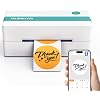
Rongta Thermal Shipping Label Printer, Bluetooth Wireless 4x6 Sticker Label Maker for Package, Compatible with Windows, Mac, Android & iPhone, Used
88% of respondents would recommend this to a friend
Item #:
110712363
ANG 55
Price Details
Excluding Shipping & Custom charges ( Shipping and custom charges will be calculated on checkout )
*All items will import from US
39%
In stock
 Imported from USA store
QTY:
Only 3 items left in stock.
Order now and get it around Friday, June 26
Secured transaction
Ubuy works hard to protect your security and privacy. Our advanced payment security system ensures confidentiality by encrypting your information during transmission using AES (Advanced Encryption Standards) and SSL (Secure Socket Layer) protocols. Your payment details are 100% secure as we do not share your payment details with third party sellers.
Our Top Logistics Partners


Streamline your shipping operations with the Rongta Thermal Label Printer, designed specifically for small businesses and e-commerce sellers.

Fast
Shipping

Free
Return*

Secure Packaging

100% Original Products

PCI DSS Compliance

ISO 27001 Certified


What Stands Out
Wireless Convenience
Eliminate clutter with Bluetooth connectivity, allowing seamless wireless printing from multiple devices like Windows, Mac, Android, and iOS for maximum convenience and flexibility.
Versatile Compatibility
Compatible with various platforms including Amazon, eBay, Etsy, and Shopify, making it the ideal choice for small businesses seeking easy label printing solutions across multiple e-commerce channels.
High-Quality Output
Delivers sharp, clear 4x6 labels, ensuring professional quality that enhances your branding and informs customers effectively, addressing the need for quality in shipping labels.
Product Details
- Phone/Ipad Conection Via Bluetooth: Wireless Bluetooth connection for IOS & Android smartphone by RT-Elabel. Attention: please kindly download or Update Newest "RT-Elabel" app from Google Play and the App Store. This versatile app enables you to easily create and edit text, symbols, icons, and barcodes. Import PDF files, share from social media or shipping/selling platforms, and select our app to print
- PC/Laptop Conection Via Driver:Please first download computer drivers or by contacting us directly! Step 1 : Download the driver; Step 2 :Connect the computer and printer using a USB Cable.
- Cost-Effective for Your Business: Our advanced thermal printing techbology by no inkless, cost-less, and the label printer prints labels from 1”- 4.4” Width, a broader range of applications, including 4x6'' shipping labels, 3x2'' product labels, 3x1'' address labels, 2x2'' circle labels, 2.25x1.25'' product SKU labels, 2x1'' barcode labels, 1x1”QR code label. The clear and professional print quality, combined with high-speed and high-volume capabilities, significantly enhances work efficiency.
- Box Contents: Each package includes 1 Rongta Label Printer, adhesive labels, 1 Power Adapter, 1 USB Cable and 1 User Manual. Consult the provided tutorials for swift printing initiation within minutes.
- Note: 1) Windows PC can Connect via Bluetooth and must Install Bluetooth driver (not USB driver); 2) Bluetooth connection is not available for printing on the MacOS laptop
| Printer Type | Thermal |
| Other Special Features of the Product | Auto Document Feeder |
| Printer Output Type | Monochrome |
| Item Weight | 1.5 Kilograms |
| Item Dimensions D x W x H | 8.66"D x 3.54"W x 4.13"H (22 x 9 x 10.5 cm) |
| Controller Type | Android, iOS |
| Print media | Labels |
| Scanner Type | Sheetfed |
| Maximum Copy Speed Black and White | 60 ppm |
| Compatible Devices | Laptops, PC, Smartphones, Tablets |
| Maximum Copies Per Run | High number (exact value not specified) |
| Additional Printer Functions | Print Only |
| Control Method | App |
| Processor Count | 1 |
| Number of Drivers | 2 |
| Resolution | 203 x 203 |
| Color | White-Bluetooth |
| Maximum Print Resolution Black and White | 203 x 203 DPI Dots Per Inch (515.6 cm) |
| Dual-sided printing | No |
| Duplex | Simplex |
| Maximum Copy Resolution Black and White | 203 DPI |
| Brand | Rongta |
| Model Name | Shipping Label Printer-RP421A |
| Model Number | Shipping Label Printer-RP421A |
| Built-In Media | 1 Printer, 1 Power Cord, 1 USB Cable, 1 Quick Start Guide, adhesive labels |
| Model Series | RP421A |
| Specific Uses For Product | Business, Home, Office |
| UPC | 798156386535 |
| Manufacturer | Rongta |
| B&W Pages per Minute | 72 ppm |
| Maximum Media Size | 4.1 x 9.5 inch (10.4 cm) |
| Maximum Sheet Capacity | 500 |
| Paper Size | 4x6 Inches (116.8 cm) |
| Printer Connectivity Type | Bluetooth, USB |
| Hardware Interface | USB |
| Total USB 3.0 Ports | 1 |
| Total Usb Ports | 1 |
| Connectivity Technology | Bluetooth, USB |
| Printing Technology | Thermal |
| Special Feature | Auto Document Feeder |
| Printer Output | Monochrome |
| Max Printspeed Monochrome | 72 ppm |
| Product Dimensions (L x W x H) | 8.66"D x 3.54"W x 4.13"H (22 x 9 x 10.5 cm) |
What's in the box
1 Printer, 1 Power Cord, 1 USB Cable, 1 Quick Start Guide, adhesive labels
Who Should Buy?

-
Small Business Owners
Ideal for entrepreneurs shipping products on platforms like Amazon and eBay, saving time and improving efficiency.
-
Online Retailers
Perfect for those needing cost-effective printing solutions for shipping labels, enhancing order fulfillment processes.
-
Mobile Professionals
Great for individuals needing portable label printing capabilities while on the go, maintaining flexibility and convenience.

-
Heavy Volume Shippers
Not suitable for businesses requiring high-speed printing or large volume output in a short timeframe.
-
Inexperienced Users
May be challenging for novices lacking technical skills, causing potential frustration in setup and operation.
-
Non-Compatible Systems
Users with outdated or unsupported operating systems may encounter compatibility issues, limiting functionality and ease of use.
Product Description
Have any Query? Chat with us
Customer Questions & Answers
-
Question:
What devices are compatible with the Rongta Bluetooth Thermal Shipping Label Printer?
Answer: The Rongta Bluetooth Thermal Shipping Label Printer is designed to work seamlessly with a variety of devices, including Windows PCs, Macs, and Android smartphones. This broad compatibility ensures that you can connect your label printer with your preferred device, making it convenient to print shipping labels from your existing equipment. For example, if you're running a small business, you can easily print labels directly from your inventory management software on Windows or Mac, or even on-the-go via your Android device, enhancing your operational efficiency. -
Question:
What are the benefits of using a thermal label printer for shipping packages?
Answer: Using a thermal label printer, such as the Rongta model, offers numerous advantages for shipping packages. These printers utilize heat to transfer ink onto labels, eliminating the need for ink cartridges. This not only reduces overall costs but also simplifies maintenance. Furthermore, thermal labels are water and smudge-resistant, ensuring clear and durable printing in various environments. This is particularly beneficial for businesses that frequently send out packages, as it helps maintain professionalism and clarity in shipping labels. -
Question:
How do I set up the Rongta Bluetooth Thermal Shipping Label Printer?
Answer: Setting up the Rongta Bluetooth Thermal Shipping Label Printer is straightforward. Begin by unpacking the printer and installing the label roll according to the provided instructions. Next, activate the Bluetooth function on your device, and pair it with the printer by following the prompts. Once connected, you can install any necessary software or apps to facilitate printing from your device. This setup process is ideal for users who appreciate minimal hassle, allowing them to print labels more efficiently and focus on their business tasks. -
Question:
Can I print barcodes with the Rongta Bluetooth Thermal Printer?
Answer: Yes, the Rongta Bluetooth Thermal Shipping Label Printer is capable of printing barcodes, making it an excellent choice for businesses that require barcode labeling for inventory or shipping purposes. With compatible software or applications, users can easily generate barcode labels in various formats. This functionality is beneficial for managing stock levels and enhancing tracking accuracy during shipping, which can be particularly vital for small to medium businesses aiming to streamline their logistics. -
Question:
Is there a specific label size that needs to be used with this printer?
Answer: The Rongta Bluetooth Thermal Shipping Label Printer is designed to work with 4x6 inch labels, which are the standard size for shipping and address labels. Using the proper label size ensures optimal printing results and avoids potential jams or errors during the printing process. This is practical for e-commerce sellers, who often need to print large volumes of labels quickly and efficiently. Be sure to choose high-quality thermal labels to achieve the best performance and print quality. -
Question:
What features enhance the usability of the Rongta Bluetooth Thermal Printer?
Answer: The Rongta Bluetooth Thermal Shipping Label Printer boasts several user-friendly features that enhance usability, including wireless Bluetooth connectivity, compact design, and high-speed printing capabilities. Its wireless feature allows for a clutter-free workspace, while the compact size makes it easy to fit into any office setup. Additionally, its high-speed printing saves time, which is critical for businesses with a high volume of packages. Such features make this printer a valuable asset for anyone looking to boost their shipping process. -
Question:
Can I use this printer for other purposes besides shipping labels?
Answer: Absolutely! While the primary function of the Rongta Bluetooth Thermal Shipping Label Printer is to print shipping labels, it can also be used for other labeling needs such as inventory tags, barcode labels, and even promotional materials. This versatility is perfect for businesses that require a multi-functional solution for their printing needs. For instance, a retailer could print price tags alongside shipping labels using the same printer, optimizing both space and resources in their operations. -
Question:
How does the Bluetooth connection improve the printing experience?
Answer: The Bluetooth connection of the Rongta printer enhances the printing experience by providing wireless convenience and mobility. Users can print from anywhere within the Bluetooth range, reducing the need for cables and allowing for more flexible workspace arrangements. This is especially useful for busy environments where multiple devices may need to connect to the printer. For small business owners, this feature means you can easily print labels directly from your mobile device, streamlining the packing process. -
Question:
What kind of maintenance is required for the Rongta Bluetooth Thermal Printer?
Answer: Maintaining the Rongta Bluetooth Thermal Shipping Label Printer involves a few simple steps to ensure longevity and optimal performance. Regularly clean the print head to prevent residue buildup, which can affect print quality. Additionally, check and replace the label roll as necessary. This minimal maintenance requirement makes the printer an appealing choice for businesses, as it allows users to focus on their core operations with less downtime due to maintenance issues. -
Question:
Where can I buy the Rongta Bluetooth Thermal Shipping Label Printer in curacao?
Answer: You can purchase the Rongta Bluetooth Thermal Shipping Label Printer from Ubuy in curacao. Ubuy provides an easy and efficient shopping experience with access to various products, ensuring you can find the label printer along with the necessary accessories to get started right away. Their platform is user-friendly, making it simple to navigate and complete your purchase quickly.
Rongta Label Printers Shipping Label Printer-RP421A Editorial Review


The Rongta Bluetooth Label Printer 4x6 has garnered a generally positive reception among users, particularly for its efficiency and reliability. Many customers highlight its ease of setup and fast printing capabilities, which make it a favored choice for those needing to print shipping labels quickly. Users appreciate the compact design, which allows for easy placement without taking up much space in their work environment. Consistent performance has been a significant talking point, with several reviewers noting that the printer delivers accurate results and has proven to be durable. Business professionals have expressed their satisfaction with its quality, comparing it favorably to much more expensive alternatives without compromising on functionality. In many cases, purchasers find themselves recommending the printer to clients, emphasizing its cost-effectiveness and reliability. However, not all feedback is entirely positive. A few users have experienced issues with the printing quality and app glitches, indicating that while the majority enjoy the printer's performance, there are some who encounter technical difficulties that can mar their experience. The suggestion to invest a bit more in the Bluetooth version indicates a desire for added convenience and functionality not all users are experiencing. In summary, the Rongta Bluetooth Label Printer 4x6 is viewed as a competent and economical solution for both personal and small business label printing needs, with its speed, accuracy, and affordability standing out as key benefits. **
Customer Reviews & Ratings
183 customers ratings
-
5 Star
70%
-
4 Star
8%
-
3 Star
7%
-
2 Star
4%
-
1 Star
11%
Review this product
Share your thoughts with other customers
Pros
- Fast printing capabilities.
- Easy setup process.
- Compact and space-saving design.
- Durable and reliable performance.
- Cost-effective compared to higher-end models.
Cons
- Some users experienced app glitches.
Product Price History
Important information
- Limitations : For products shipped internationally, please note that any manufacturer warranty may not be valid; manufacturer service options may not be available; product manuals, instructions, and safety warnings may not be in destination country languages; the products (and accompanying materials) may not be designed in accordance with destination country standards, specifications, and labeling requirements; and the products may not conform to destination country voltage and other electrical standards (requiring use of an adapter or converter if appropriate). The recipient is responsible for assuring that the product can be lawfully imported to the destination country. When ordering from Ubuy or its affiliates, the recipient is the importer of record and must comply with all laws and regulations of the destination country.
- Not all the products listed on Ubuy are for sale, as Ubuy is a global search engine. Products are subject to export/trade regulations.
ANG 55
Order now and get it around Friday, June 26
This item is not restrict in my country.(Please click on above link if this item is not restrict in your country, So our team will review and allow.)
QTY:
Only 3 items left in stock.
Secured transaction
Ubuy works hard to protect your security and privacy. Our advanced payment security system ensures confidentiality by encrypting your information during transmission using AES (Advanced Encryption Standards) and SSL (Secure Socket Layer) protocols. Your payment details are 100% secure as we do not share your payment details with third party sellers.
Our Top Logistics Partners
Fastest cross-border delivery
Features & Benefits
- Quick and hassle-free setup using included USB flash drive.
- Compatible with Windows, Mac, Chromebook, and Linux via USB.
- Supports label sizes from 1.57 to 4.1 inches with auto calibration.
- High printing speed of 150mm/sec, producing 80 labels per minute.
- Works seamlessly with major platforms like Shopify, Etsy, and USPS.
- Lifetime technical support ensures a smooth user experience.