- Startpagina /
- Kantoorartikelen /
- Kantoor- & Schoolbenodigdheden /
- Writing & Correction Supplies /
- Technical Drawing Supplies /
- Templates /
- Computer Shortcuts QuickStudy Laminated Refer...
Computer Shortcuts QuickStudy Laminated Reference Guide Quick Study Computer
ANG 21
Price Details
Excluding Shipping & Custom charges ( Shipping and custom charges will be calculated on checkout )
*All items will import from VS
QTY:
Ubuy works hard to protect your security and privacy. Our advanced payment security system ensures confidentiality by encrypting your information during transmission using AES (Advanced Encryption Standards) and SSL (Secure Socket Layer) protocols. Your payment details are 100% secure as we do not share your payment details with third party sellers.
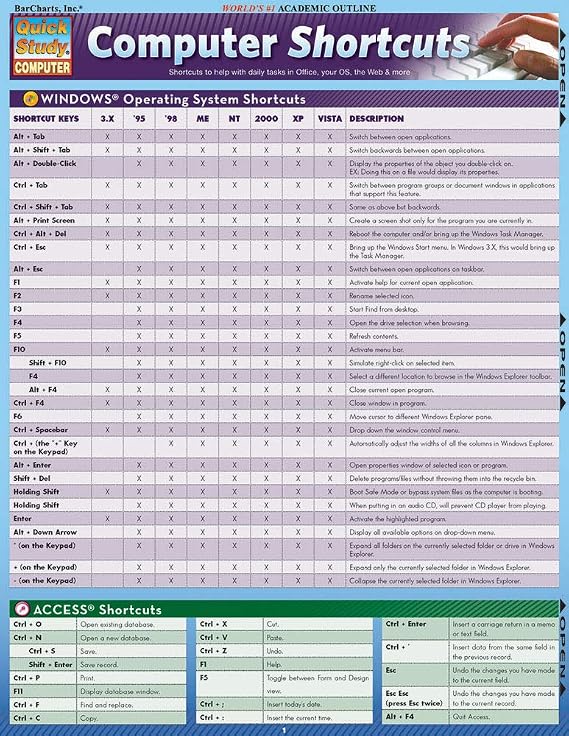
This 2-panel (4-page) guide points out helpful shortcuts that can be found within the most popular Windows PC and Apple Macintosh software.
Spoedbestelling
Gratis
retourneren*
Stevig verpakt
100% Origineel product
PCI DSS Compliance
ISO 27001 Certified

Wat opvalt
Productdetails
- 2-panel (4-page) guide for saving time while using Windows PC and Apple Macintosh software
- Points out helpful shortcuts for Windows Operating System, Access, FrontPage, PowerPoint, Publisher, QuarkXPress, InDesign, Quicken, UNIX/Linux, Internet Explorer, Mozilla Firefox, Opera, Apple Macintosh
- Includes special character shortcuts for word processing
- Useful for surfing the Web and balancing virtual checkbooks
- Published in September 2008
- Part of the Quick Study Computer Misc. Supplies series
| Item Weight | 0.5 lbs (230 grams) |
Voor wie is dit geschikt?
-
Students
Helpful for students learning computer software, providing quick reference to essential shortcuts for efficient study.
-
Office Workers
Ideal for office professionals needing quick access to keyboard shortcuts to enhance productivity and streamline tasks.
-
Beginner Users
Great for newcomers to computers, helping them quickly learn and memorize essential shortcut keys for various applications.
-
Advanced Users
Not suitable for advanced users who already know shortcuts, may find it too basic and lacking in depth.
-
Graphical Designers
Limited utility for graphic designers who require specialized shortcuts for design software beyond basic functionalities.
-
Casual Users
Casual users may not benefit significantly; shortcuts could be overwhelming and not frequently needed for basic tasks.
PRODUCTBESCHRIJVING
Computer Shortcuts QuickStudy Laminated Reference Guide Quick Study Computer
Vragen & Antwoorden van klanten
-
vraag:
What are the benefits of using computer shortcuts?
antwoord: Utilizing computer shortcuts significantly enhances your efficiency and productivity while working. Instead of navigating through multiple menus, you can execute commands with a simple keyboard combination, saving you time and effort. For instance, using 'Ctrl+C' to copy and 'Ctrl+V' to paste can streamline your workflow drastically. This is particularly useful for professionals who work with large datasets or need to manage numerous documents simultaneously. -
vraag:
How can I learn computer shortcuts quickly?
antwoord: Learning computer shortcuts can be done effectively through repeated practice and utilizing cheat sheets. A Quick Study guide can provide you with a comprehensive list of the most essential shortcuts tailored to your operating system. Regularly referencing these shortcuts while you work will help commit them to memory. For example, practicing the shortcuts for document formatting in word processors can vastly improve your document creation speed. -
vraag:
Are computer shortcuts the same across different platforms?
antwoord: No, computer shortcuts can vary significantly between operating systems and applications. For instance, 'Ctrl+Z' undoes an action on Windows, while 'Command+Z' does the same on macOS. Familiarizing yourself with the shortcuts specific to your frequently used software will enhance your effectiveness. This can have a major impact on your productivity, especially if you work in a mixed-platform environment. -
vraag:
Which computer shortcuts are most useful for office work?
antwoord: Some of the most useful shortcuts for office work include 'Ctrl+S' for saving documents, 'Alt+Tab' for switching between open applications, and 'Ctrl+A' to select all text. Knowing these shortcuts can accelerate your workflow and reduce the time spent on repetitive tasks. For instance, if your job involves frequent file management, mastering these shortcuts will make navigating between documents more efficient. -
vraag:
How do I customize keyboard shortcuts on my computer?
antwoord: Customizing keyboard shortcuts can usually be done through the settings or preferences menu of most software applications. This feature allows you to set your own combinations for specific tasks. For example, if you use certain commands frequently, personalizing shortcuts can enhance your workflow. A graphic designer might customize shortcuts in design software to speed up their creative process. -
vraag:
Can computer shortcuts help with accessibility?
antwoord: Absolutely, computer shortcuts can greatly improve accessibility for users with disabilities. Many shortcuts are designed to reduce reliance on a mouse, enabling users to navigate and interact with software more easily. For individuals with mobility restrictions, utilizing keyboard shortcuts can facilitate smoother operation of their devices, making technology more inclusive and user-friendly. -
vraag:
How do I remember computer shortcuts longer-term?
antwoord: To retain computer shortcuts long-term, consistent usage is key. Incorporating these shortcuts into your daily workflow will help embed them in your memory. Using mnemonic devices can also aid memorization. For instance, you might associate 'Ctrl+P' with 'Print' because both words start with 'P'. Regular practice in relevant contexts, like document creation, will reinforce your memory effectively. -
vraag:
Where can I find a comprehensive list of computer shortcuts?
antwoord: A Quick Study guide is an excellent resource for finding a comprehensive list of computer shortcuts. It condenses essential information into an easy-to-reference format, making it a perfect learning tool for users of all skill levels. Utilizing such a guide can help you quickly identify the most relevant shortcuts for your needs, enhancing your productivity during tasks. -
vraag:
How do different software applications utilize shortcuts?
antwoord: Different software applications have unique sets of shortcuts tailored to their functionalities. For example, word processors have shortcuts geared towards text formatting, while spreadsheet programs focus on data manipulation. Familiarizing yourself with these specialized shortcuts can help maximize your efficiency. In a data analysis role, knowing the shortcuts for navigating and manipulating data in spreadsheets can significantly speed up your analysis tasks. -
vraag:
Where can I buy Computer Shortcuts Quick Study Computer Misc. Supplies?
antwoord: You can purchase the Computer Shortcuts Quick Study guide from Ubuy in curacao. Ubuy offers a variety of educational resources, including this guide, which is designed to help you enhance your computer skills by providing a concise summary of essential shortcuts.
QuickStudy Templates Editorial Review
Customer reviews for the Computer Shortcuts Quick Study Computer Misc. Supplies are mixed. While some customers find it to be a very useful and affordable product with good information, others find it to be outdated and not helpful at all. It is worth noting that some reviews mention that the product was last updated for windows VISTA 2007, which makes it quite old. However, others appreciate the convenient shortcut collection and find it handy to keep nearby. Overall, if you have an older Windows operating system and are looking for a quick reference guide to computer shortcuts, this product may be worth checking out. However, if you have a more recent operating system, it is probably best to find a more up-to-date resource.
Klantbeoordelingen en -waardering
-
5 ster
100%
-
4 ster
0%
-
3 ster
0%
-
2 ster
0%
-
1 ster
0%
Beoordeel dit product
Deel uw mening met andere klanten
Voordelen
- Very affordable
- Convenient shortcut collection
- Handy to keep nearby
- Good information for study
Nadelen
- Outdated for newer Windows operating systems
Prijs-/productgeschiedenis
Belangrijke informatie
- Beperkingen: voor producten die internationaal worden verzonden, gelieve er rekening mee te houden dat eventuele fabrieksgaranties mogelijk niet geldig zijn; ondersteuningsopties van de fabrikant zijn mogelijk niet beschikbaar; producthandleidingen, instructies en veiligheidswaarschuwingen zijn mogelijk niet in de taal van het land van bestemming; de producten (en bijbehorende materialen) zijn mogelijk niet ontworpen in overeenstemming met de normen, specificaties en etiketteringsvereisten van het land van bestemming; en de producten zijn mogelijk niet in overeenstemming met de voltage- en andere elektriciteitsstandaarden van het land van bestemming (waardoor het gebruik van een adapter of omvormer nodig is, indien van toepassing). De ontvanger is ervoor verantwoordelijk zich ervan te verzekeren dat het product rechtmatig kan worden geïmporteerd naar het land van bestemming. Bij het bestellen bij Ubuy of diens partners geldt de ontvanger als de geregistreerde invoerder en dient zich als zodanig te houden aan alle wetten en voorschriften van het land van bestemming.
- Omdat Ubuy een wereldwijde zoekmachine is, zijn niet alle producten die op Ubuy worden vermeld ook te koop. Producten zijn onderworpen aan wetgeving inzake export en handel.
ANG 21
Bestel nu en ontvang het rond Zaterdag, Juni 27
Dit product is wel in mijn land verkrijgbaar. (Klik op de knop hierboven als dit artikel wel in jouw land verkrijgbaar is. Ons team zal het controleren en aanpassen.)
QTY:
Ubuy works hard to protect your security and privacy. Our advanced payment security system ensures confidentiality by encrypting your information during transmission using AES (Advanced Encryption Standards) and SSL (Secure Socket Layer) protocols. Your payment details are 100% secure as we do not share your payment details with third party sellers.
Kenmerken en voordelen
- Find helpful shortcuts for the most popular Windows PC and Apple Macintosh software
- Saves time while surfing the web or balancing a virtual checkbook
- Includes special character shortcuts for word processing.