- Startpagina /
- Elektronica /
- Television & Video /
- Tv-accessoires /
- Afstandsbedieningen /
- Repair Membrane for Logitech Harmony Remote 6...
0 ratings


Artikelnr.:
40543004
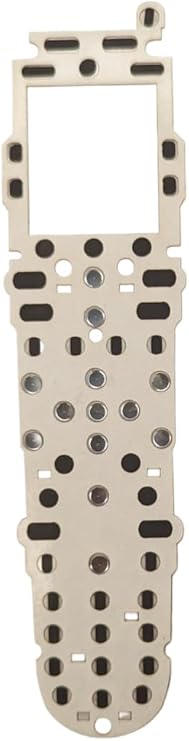
Repair Membrane for Logitech Harmony Remote 600 650 665 700
87% van de respondenten zou dit aanraden aan een vriend
Artikelnr.:
40543004
ANG 66
Prijsdetails
Exclusief verzend- en douanekosten ( Verzend- en douanekosten worden berekend bij het afrekenen )
*Alle artikelen worden geïmporteerd vanuit VS
0 ratings
Schrijf een beoordeling
Op voorraad
 Geïmporteerd uit USA
Bestel nu en ontvang het rond Woensdag, September 30
Beveiligde transactie
Ubuy zet zich in om uw veiligheid en privacy te beschermen. Ons geavanceerde beveiligingssysteem voor betalingen zorgt voor vertrouwelijkheid door uw gegevens tijdens verzending te versleutelen met AES (Advanced Encryption Standards) en SSL (Secure Socket Layer) protocollen. Uw betalingsgegevens zijn 100% veilig, aangezien wij uw betalingsgegevens niet delen met externe verkopers.
Onze beste bezorgdiensten


ButtonWorx is the only button repair that can last, Tested over 1 million button presses!

Spoedbestelling

Gratis
retourneren*

Stevig verpakt

100% Origineel product

PCI DSS Compliance

ISO 27001 Certified



Wat opvalt
Precision Fit
Designed specifically for Logitech Harmony Remote models 600, 650, 665, and 700, ensuring a perfect fit that restores functionality and enhances user experience while prolonging the remote's lifespan.
Easy Installation
User-friendly installation process allows for quick replacement without the need for professional assistance, making it accessible for anyone to restore their remote quickly and efficiently.
Durable Quality
High-quality materials ensure long-lasting durability, resisting wear and tear while providing a reliable solution that protects devices and enhances usability for everyday remote control functions.
Productdetails
- ButtonWorx membrane repair kit is designed for Logitech Harmony Remote Models 600, 650, 665, and 700, and it is installed onto the circuit board under the original keypad.
- The repair kit facilitates the completion of the switch by pressing down on the ButtonWorx pad when the old rubber buttons engage, effectively taking over the electrical function of the original rubber buttons.
- Tested over 1 million button presses, the repair kit is specifically designed to address the wear and tear issues of rubber contact buttons, particularly for directional, channel, and volume functions.
- Featuring a 2mm thick acrylic light pipe plastic, the repair kit requires careful placement to ensure it covers the power button on the top left and properly touches the circuit board. Additionally, the light pipe plastic needs to be positioned on top of the repair, completing the layers as follows: 1. Green circuit board, 2. Paper-thin white sticker holding the metal snap domes in place, 3. ButtonWorx membrane repair pad, 4. Thick plastic light pipe with white reflector, and 5. Original rubber keypad.
- Updated in 2023, the repair kit now offers an easy Put-In-Place installation, although it does require disassembly of the remote for installation
- The ButtonWorx repair membrane is the only solution that can effectively address the wear issues with rubber keypads, providing a long-lasting fix. It is a reliable alternative to traditional peel-and-stick pieces.
| Package Weight | 1 Pound |
Voor wie is dit geschikt?

-
DIY Enthusiasts
Individuals who enjoy repairing their devices will appreciate the ease of use and cost-effectiveness of this product.
-
Harmony Remote Users
Users of models 600, 650, 665, and 700 will find this replacement membrane perfect for restoring functionality.
-
Budget-Conscious Consumers
People looking to save money on replacing their remotes will benefit from this affordable repair option.

-
Non-Technical Users
Individuals with limited technical skills may struggle to install the repair membrane successfully on their remote.
PRODUCTBESCHRIJVING
Repair Membrane for Logitech Harmony Remote 600 650 665 700
About This Item
Introducing the ButtonWorx Repair Membrane for Logitech Harmony Remote Models 600, 650, 665, and 700! Are you tired of dealing with worn-out buttons on your Logitech Harmony remote? Look no further, because we have the perfect solution for you. The ButtonWorx Repair Membrane is designed specifically for Logitech Harmony remotes, providing a quick and easy fix for unresponsive or worn-out buttons. Compatible with a wide range of Logitech Harmony remote models, including the popular Logitech Harmony 650, 665, and 700, this replacement membrane ensures that your remote stays in perfect working condition. With its easy installation process, you don't need any professional help to fix your remote.
Simply remove the old membrane and replace it with the ButtonWorx Repair Membrane. It's as easy as that! Not only will this replacement membrane restore the functionality of your Logitech Harmony remote, but it will also enhance its durability. Made with high-quality materials, the ButtonWorx Repair Membrane is built to last, ensuring that you can continue enjoying seamless control over your devices for years to come. Investing in the ButtonWorx Repair Membrane means saving yourself the hassle and expense of purchasing a brand new remote.
You'll be amazed at how a simple replacement can bring new life to your Logitech Harmony remote. Don't let worn-out buttons ruin your remote control experience. Upgrade your Logitech Harmony remote with the ButtonWorx Repair Membrane today and say goodbye to unresponsive buttons. Order now and regain full control over your devices!.
Heeft u een vraag? Chat met ons
Vragen en antwoorden van klanten
-
vraag:
What is a repair membrane for Logitech Harmony remotes?
antwoord: A repair membrane is a thin, flexible layer designed to restore the functionality of the buttons on Logitech Harmony Remote models 600, 650, 665, and 700. This membrane acts as a bridge between the control panel and circuit board, ensuring that each button press is registered accurately. Over time, the original membrane can wear out due to extensive use, leading to unresponsive buttons. Replacing the membrane can revitalize your remote, making it fully operational again, which is essential for a seamless home entertainment experience. -
vraag:
How do I know if my Logitech Harmony remote needs a new repair membrane?
antwoord: Signs that your Harmony remote might need a new repair membrane include buttons that do not respond when pressed, inconsistent functionality, or buttons that require multiple presses to register. If you've checked that the batteries are functioning properly and the issue persists, it is likely due to a deteriorated membrane. In such cases, replacing the membrane can restore the original functionality, allowing you to easily control your devices without frustration. -
vraag:
Can I install the repair membrane myself?
antwoord: Yes, installing a repair membrane for your Logitech Harmony remote is a DIY-friendly task. The process generally involves disassembling the remote, carefully removing the old membrane, and placing the new one in its position. Many users find step-by-step instructional videos online to guide them through the process. With a little patience and careful handling, you can successfully replace the membrane, saving costs on professional repairs and extending the lifespan of your remote. -
vraag:
What tools do I need to replace the repair membrane?
antwoord: To replace the repair membrane of your Logitech Harmony remote, you'll typically need a few basic tools: a small Phillips screwdriver to open the remote casing, a pair of tweezers to handle the components delicately, and possibly a plastic spudger to help pry the casing open without damage. Having a clean, well-lit workspace will also make the task easier, ensuring you can manage small parts effectively during the repair process. -
vraag:
Will replacing the repair membrane affect the functionality of my remote?
antwoord: No, replacing the repair membrane should enhance the functionality of your remote. If installed correctly, the new membrane will allow your buttons to respond as they did when the remote was new. This restoration is vital, especially for models like the Logitech Harmony 600, 650, 665, and 700, where repeated use may degrade button sensitivity. Therefore, a successful installation can significantly improve your user experience and overall satisfaction with your remote. -
vraag:
Where can I buy a repair membrane for Logitech Harmony Remote models 600, 650, 665, 700?
antwoord: You can buy a repair membrane for Logitech Harmony Remote models 600, 650, 665, and 700 from Ubuy. Ubuy provides a convenient online shopping platform where you can easily find spare parts for your electronics, including high-quality repair membranes tailored for your specific remote model. This ensures you receive components that meet the necessary specifications for a seamless installation and restoration of your remote's functions. -
vraag:
How much does a repair membrane cost on average?
antwoord: While I cannot provide specific price ranges, repair membranes for Logitech Harmony remotes are generally budget-friendly. The cost typically varies based on factors like store pricing policies and availability. However, investing in a new membrane is often significantly less expensive than purchasing a brand-new remote. This cost-effectiveness makes it an appealing option for maintaining your home entertainment system without breaking the bank. -
vraag:
Are there any compatibility issues with the repair membrane?
antwoord: When purchasing a repair membrane, ensure that it is specified for Logitech Harmony Remote models 600, 650, 665, and 700. Compatibility should not be an issue if the membrane is designed for your exact model, given that these remotes share similar internal layouts. However, avoid using membranes from unrelated models, as they may not provide the correct fit or functionality, leading to further issues. -
vraag:
How long does it take to replace the repair membrane?
antwoord: Replacing the repair membrane on your Logitech Harmony remote can typically be completed in 30 minutes to an hour, depending on your experience level with such repairs. Factors like familiarity with electronics repair and the tools at hand can speed up the process. However, take your time to ensure each step is done carefully, as rushing can lead to mistakes that may damage the remote or the new membrane. -
vraag:
Can a repair membrane fix all button issues on my remote?
antwoord: While a repair membrane can resolve most button-related issues caused by wear and tear, it may not fix problems stemming from other components, such as the circuit board or battery connections. If the buttons still do not work after a membrane replacement, it may be worth investigating further into the internal components. Proper diagnosis can help you identify whether a membrane replacement alone will suffice or if further repairs are necessary.
buttonworx Remote Controls Editorial Review
Geen beoordelingen van de redactie gevonden
Klantbeoordelingen en -waardering
1 klantenbeoordelingen
-
5 ster
100%
-
4 ster
0%
-
3 ster
0%
-
2 ster
0%
-
1 ster
0%
Beoordeel dit product
Deel uw mening met andere klanten
VERTROUWEN IN HET PLATFORM & KOPERSZEKERHEID

JK
Jasmin
Geverifieerde koper
“Great products and very good service: very easy and very fast international delivery.”
9 September 2026 · via Trustpilot
AG
Anke
Geverifieerde koper
“Wonderful online shopping experience, smooth transaction from the start. Payment method works conveniently and delivery is unexpectedly fast and reliable. You go the extra mile for service. What makes this even more amazing, you deliver to Namibia. I will remain a happy Ubuy customer and will increase my purchases for sure! Thank you!”
10 September 2026 · via Trustpilot
H
Hazel
Geverifieerde koper
“Very easy to find the products what you need, and so fast delivery, that’s why I highly recommended to others costumers to used ubuy.”
10 September 2026 · via Trustpilot
O
Opaleye
Geverifieerde koper
“I received exactly what I ordered I was skeptical about your site because that was my first time to order. But the order came timely and neatly packaged. I was not disappointed. Thank you.”
11 September 2026 · via Trustpilot
AC
Adele
Geverifieerde koper
“Easy to find and order what you want on the website. Delivery is quick to the UK”
8 September 2026 · via Trustpilot
Veilig Afrekenen
Wereldwijde levering
Eenvoudig retourneren
Originele producten
Prijsgeschiedenis van het product
Belangrijke informatie
- Beperkingen: voor producten die internationaal worden verzonden, gelieve er rekening mee te houden dat eventuele fabrieksgaranties mogelijk niet geldig zijn; ondersteuningsopties van de fabrikant zijn mogelijk niet beschikbaar; producthandleidingen, instructies en veiligheidswaarschuwingen zijn mogelijk niet in de taal van het land van bestemming; de producten (en bijbehorende materialen) zijn mogelijk niet ontworpen in overeenstemming met de normen, specificaties en etiketteringsvereisten van het land van bestemming; en de producten zijn mogelijk niet in overeenstemming met de voltage- en andere elektriciteitsstandaarden van het land van bestemming (waardoor het gebruik van een adapter of omvormer nodig is, indien van toepassing). De ontvanger is ervoor verantwoordelijk zich ervan te verzekeren dat het product rechtmatig kan worden geïmporteerd naar het land van bestemming. Bij het bestellen bij Ubuy of diens partners geldt de ontvanger als de geregistreerde invoerder en dient zich als zodanig te houden aan alle wetten en voorschriften van het land van bestemming.
- Omdat Ubuy een wereldwijde zoekmachine is, zijn niet alle producten die op Ubuy worden vermeld ook te koop. Producten zijn onderworpen aan wetgeving inzake export en handel.
ANG 66
Bestel nu en ontvang het rond Woensdag, September 30
Dit product is wel in mijn land verkrijgbaar. (Klik op de knop hierboven als dit artikel wel in jouw land verkrijgbaar is. Ons team zal het controleren en aanpassen.)
QTY:
Beveiligde transactie
PCI DSS-compliant en ISO 27001:2022-gecertificeerd, met versleutelde betalingen en volledige kopersbescherming bij elke bestelling.
Onze beste bezorgdiensten
Snelste grensoverschrijdende levering
Kenmerken en voordelen
- ButtonWorx membrane repair kit lasts long
- 2023 updated with easy Put-In-Place installation
- Needs disassembling and cleaning the device for installation
- Repairs all worn out rubber contact buttons
- Directional, channel and volume keys can only be cleaned
- Comes with 2mm thick acrylic light pipe plastic for placement
Ubuy-garantie
Ervaar zorgeloos winkelen met 100% originele producten, PCI DSS-conforme betalingsbeveiliging, ISO 27001-gecertificeerde gegevensbescherming, de snelste grensoverschrijdende levering, gratis retourneren *, en veilige verpakking bij elke bestelling.