- Startpagina /
- Elektronica /
- Computers, Laptops and Tablets /
- Computer Accessories /
- Docking Stations & Locks /
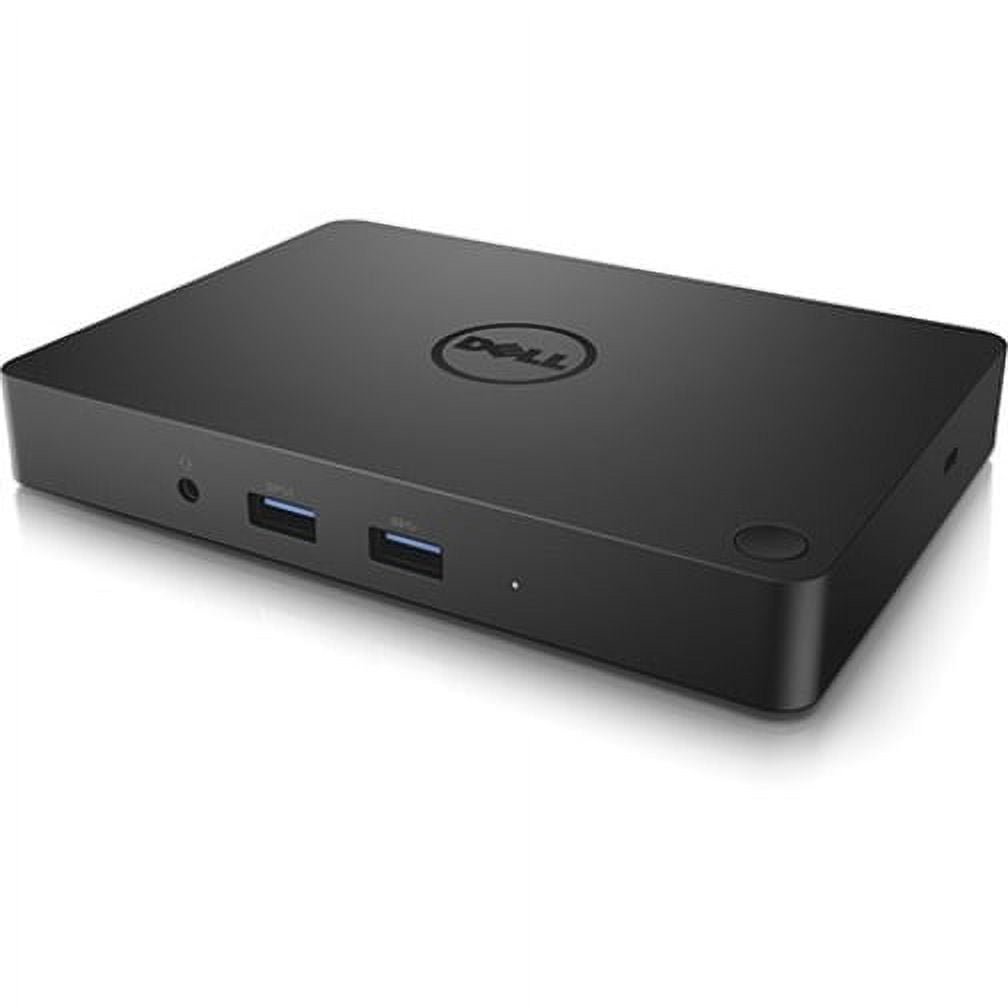
- Dell WD15 Docking Station
0 ratings

Artikelnr.:
63203714
Dell WD15 Docking Station
Artikelnr.:
63203714
ANG 120
Price Details
Excluding Shipping & Custom charges ( Shipping and custom charges will be calculated on checkout )
*All items will import from VS
0 ratings
Schrijf een beoordeling
Op voorraad
 Geïmporteerd uit USA
QTY:
Bestel nu en ontvang het rond Sunday, Augustus 23
Beveiligde transactie
Ubuy works hard to protect your security and privacy. Our advanced payment security system ensures confidentiality by encrypting your information during transmission using AES (Advanced Encryption Standards) and SSL (Secure Socket Layer) protocols. Your payment details are 100% secure as we do not share your payment details with third party sellers.
Onze beste bezorgdiensten


Elevate your workspace with the Dell WD15 Docking Station, offering unmatched connectivity with 5 USB ports and dual display options!

Spoedbestelling

Gratis
retourneren*

Stevig verpakt

100% Origineel product

PCI DSS Compliance

ISO 27001 Certified


Wat opvalt
Versatile Connectivity
Offers multiple ports including USB-C, HDMI, and Ethernet, seamlessly connecting various devices for enhanced productivity in a single connection.
Power Delivery
Delivers up to 130W of power through USB-C, charging laptops while enabling data transfer, ensuring devices stay powered all day without extra chargers.
Compact ontwerp
Space-saving and portable design makes it ideal for home offices and workspaces, providing functional expansion without clutter.
Productdetails
- Dell WD15 Docking Station with USB Type C interface
- 5 x USB Ports, including 3 x USB 3.0 and 2 x USB 2.0
- Features HDMI, VGA, and Mini DisplayPort for video output
- Includes Network (RJ-45) port and Audio Line Out
- Connectivity via Thunderbolt technology
- California Proposition 65 warning: n/a
| Compatibiliteit | Latitude 15 (E5570), Precision 15 (3510), Precision 15 (5510), Precision 15 (7510), Precision 17 (7710), XPS 15 (9550) |
| Inputs / outputs | 5 x USB Ports, 2 x USB 2.0, 3 x USB 3.0, Network (RJ-45), HDMI, VGA, Mini DisplayPort, Audio Line Out, Thunderbolt |
| Usb version | USB 3.0 |
| Input/output quantity | 5 |
| Merk | Dell |
| Modelnaam | WD15 |
| Heeft Geschreven Garantie | Nee |
| Kleur | Zwart |
| Gewicht | 1 lb (450 gram) |
| Input/output direction | Bi-Directional |
Voor wie is dit geschikt?

-
Zakelijke professionals
Ideal for users needing multiple displays and connectivity options for efficient multitasking and productivity in office environments.
-
Frequent reizigers
Great for users who require a portable docking solution that easily connects laptops to external devices when on the go.
-
Creative Designers
Perfect for designers utilizing high-resolution monitors and diverse peripherals for graphic design, video production, or 3D modeling.

-
Gaming Enthusiasts
Not suitable for gamers seeking high performance, as it may not provide the necessary bandwidth for gaming peripherals.
PRODUCTBESCHRIJVING
Dell WD15 Docking Station
Heeft u een vraag? Chat met ons
Vragen & Antwoorden van klanten
-
vraag:
What types of USB ports does the Dell WD15 Docking Station have?
antwoord: The docking station has a total of 5 USB ports, comprising 3 USB 3.0 and 2 USB 2.0 ports. -
vraag:
Can I use multiple displays with the Dell WD15 Docking Station?
antwoord: Yes, the docking station supports both HDMI and VGA connections for dual display setups. -
vraag:
Is the Dell WD15 Docking Station easy to set up?
antwoord: Absolutely! It features a simple plug-and-play setup via the USB Type C connection for quick installation.
Dell Docking Stations & Locks Editorial Review
The Dell WD15 Docking Station offers a robust solution for users seeking to streamline their workspace and enhance their connectivity options. Designed specifically for devices like the XPS 13 9315, this dock stands out for its single power button feature, which allows users to power on their laptops easily and reduce desktop clutter. Users have noted that the WD15 maintains a cool operation, which is a Considerable improvement over other hubs that may experience overheating during extensive use. With an HDMI port capable of supporting a 4K monitor, along with several USB 3.0 and Ethernet ports, the docking station serves adequately for light office tasks. While it excels in basic functionality, it does have some limitations. Users have expressed disappointment over the necessity of a dedicated dongle to utilize the DisplayPort, as well as the requirement of initial setup time, including a couple of reboots. The lack of built-in USB-C support and the use of a traditional barrel plug instead of a more modern USB PD design has also raised concerns about the device's future-proofing capabilities. Nonetheless, the WD15 provides a user-friendly interface for managing multiple peripherals while ensuring decent functionality for everyday tasks. For those with more advanced needs, like multiple 4K displays or numerous external drives, alternative, higher-end docks might be worth Considering. However, the WD15 presents a compelling option for users looking for a reliable docking station without breaking the bank. **
Klantbeoordelingen en -waardering
1 klantenbeoordelingen
-
5 ster
100%
-
4 ster
0%
-
3 ster
0%
-
2 ster
0%
-
1 ster
0%
Beoordeel dit product
Deel uw mening met andere klanten
Voordelen
- Single power button simplifies startup.
- Good selection of ports for basic connectivity (HDMI for 4K, multiple USB 3.0, Ethernet).
- Reduces desk clutter compared to having multiple cables.
Nadelen
- Requires a dongle for DisplayPort connectivity.
Platform Trust & Buyer Confidence

MA
Mohammad
Verified buyer
“Excellent quality and original too,when ubuy send original things I will appreciate that ,I very satisfied thank you”
23 July 2026 · via Trustpilot
CK
Chitra
Verified buyer
“The order and delivery progress was communicated very well. Package arrived within the estimated time. Products arrived as expected in good condition.”
22-Jul-26 · via Trustpilot
K
kund
Verified buyer
“Good supply of products. Safe payment methods, and shipment worldwide! Genuine products.”
23-Jul-26 · via Trustpilot
OO
Onesi
Verified buyer
“Was my first time buying a product from Ubuy, but I found it so helpful. This is reliable. Gonna place a new order!”
22 July 2026 · via Trustpilot
SJ
SAO JOHN
Verified buyer
“Ubuy is a great online platform to buy stuff. Reliable, fast delivery time and great value for money. I've been using Ubuy online shopping platform for three years now and will continue to do so.”
23 July 2026 · via Trustpilot
Veilig Afrekenen
Global Delivery
Eenvoudig retourneren
Genuine Products
Prijs-/productgeschiedenis
Belangrijke informatie
- Beperkingen: voor producten die internationaal worden verzonden, gelieve er rekening mee te houden dat eventuele fabrieksgaranties mogelijk niet geldig zijn; ondersteuningsopties van de fabrikant zijn mogelijk niet beschikbaar; producthandleidingen, instructies en veiligheidswaarschuwingen zijn mogelijk niet in de taal van het land van bestemming; de producten (en bijbehorende materialen) zijn mogelijk niet ontworpen in overeenstemming met de normen, specificaties en etiketteringsvereisten van het land van bestemming; en de producten zijn mogelijk niet in overeenstemming met de voltage- en andere elektriciteitsstandaarden van het land van bestemming (waardoor het gebruik van een adapter of omvormer nodig is, indien van toepassing). De ontvanger is ervoor verantwoordelijk zich ervan te verzekeren dat het product rechtmatig kan worden geïmporteerd naar het land van bestemming. Bij het bestellen bij Ubuy of diens partners geldt de ontvanger als de geregistreerde invoerder en dient zich als zodanig te houden aan alle wetten en voorschriften van het land van bestemming.
- Omdat Ubuy een wereldwijde zoekmachine is, zijn niet alle producten die op Ubuy worden vermeld ook te koop. Producten zijn onderworpen aan wetgeving inzake export en handel.
ANG 120
Bestel nu en ontvang het rond Sunday, Augustus 23
Dit product is wel in mijn land verkrijgbaar. (Klik op de knop hierboven als dit artikel wel in jouw land verkrijgbaar is. Ons team zal het controleren en aanpassen.)
QTY:
Beveiligde transactie
PCI DSS compliant and ISO 27001:2022 certified, with encrypted payments and full buyer protection on every order.
Onze beste bezorgdiensten
Snelste wereldwijde bezorging
Kenmerken en voordelen
- Maximize productivity with 5 USB ports including 3 USB 3.0 for faster data transfer.
- Supports HDMI, VGA, and Mini DisplayPort for versatile dual display capabilities.
- Connect to the internet effortlessly with a built-in Network (RJ-45) port.
- Designed for a seamless connection via USB Type C technology.
- Ideal for home offices, workspaces, or on-the-go professionals.
- Stable wired connectivity ensures reliability and enhanced performance.
Ubuy Assurance
Experience worry-free shopping with 100% original products, PCI DSS-compliant payment security, ISO 27001-certified data protection, the fastest cross-border delivery, free returns *, and secure packaging on every order.