- Startpagina /
- Videogames /
- PC /
- Accessoires /
- Controllers /
- Flight Controls /
- Honeycomb Bravo Throttle Quadrant
0 ratings




Artikelnr.:
29974995
Honeycomb Bravo Throttle Quadrant
89% van de respondenten zou dit aanraden aan een vriend
Artikelnr.:
29974995
ANG 679
Prijsdetails
Exclusief verzend- en douanekosten ( Verzend- en douanekosten worden berekend bij het afrekenen )
*Alle artikelen worden geïmporteerd vanuit VS
0 ratings
Schrijf een beoordeling
Op voorraad
 Geïmporteerd uit USA
Bestel nu en ontvang het rond Woensdag, September 09
Beveiligde transactie
Ubuy zet zich in om uw veiligheid en privacy te beschermen. Ons geavanceerde beveiligingssysteem voor betalingen zorgt voor vertrouwelijkheid door uw gegevens tijdens verzending te versleutelen met AES (Advanced Encryption Standards) en SSL (Secure Socket Layer) protocollen. Uw betalingsgegevens zijn 100% veilig, aangezien wij uw betalingsgegevens niet delen met externe verkopers.
Onze beste bezorgdiensten


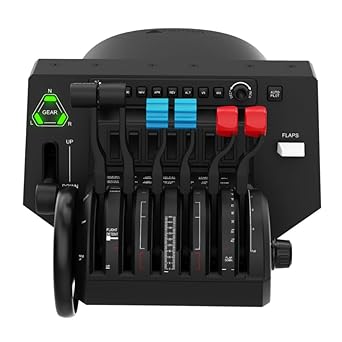
Honeycomb Aeronautical offers a universal all-in-one cockpit system with the Bravo Throttle Quadrant, supporting configurations from small single-engine planes to four-jet airliners.

Spoedbestelling

Gratis
retourneren*

Stevig verpakt

100% Origineel product

PCI DSS Compliance

ISO 27001 Certified



Wat opvalt
All-in-One System
Integrates throttle, autopilot, and annunciator panel, providing a comprehensive cockpit experience without the clutter of multiple devices, enhancing the immersive flight simulation.
Configurable Throttle Setup
Allows users to customize throttle functions according to their specific flight preferences, ensuring versatile control and improved simulation accuracy tailored to various aircraft models.
Precision Controls
Features a trim wheel and dedicated buttons for gears and flaps, ensuring precise handling and smoother operations, which enhances the realism and effectiveness of flight maneuvers.
Productdetails
| Compatible Devices | PC, Mac |
| Controller Type | Throttle Quadrant |
| Connectivity Technology | USB-C cable |
| Additional Features | Multiuse |
| Button Quantity | 1 |
| Hardware Platform | Desktop |
| Package Quantity | 1 |
| Item Dimensions | 18.2 x 13.1 x 10.2 inches (46.2 x 33.3 x 25.9 cm) |
| Item Dimensions D x W x H | 10.5"D x 13.1"W x 10.2"H (26.7 x 33.3 x 25.9 cm) |
| Color | Black |
| Brand Name | Honeycomb Aeronautical |
| Model Name | Bravo Throttle Quadrant |
| Manufacturer | Honeycomb Aeronautical |
| Global Trade Identification Number | 04039621003042 |
| Item Highlight | Flight simulator controls w/autopilot, annunciator panel, gear, flaps |
| External Testing Certification | Não aplicável |
| Model Number | AER-HONEYQUAD |
| Unit Count | 1 Count |
| Manufacturer Part Number | AER-HONEYQUAD |
| Package Weight | 14.10 Pound |
Voor wie is dit geschikt?

-
Aviation Enthusiasts
Ideal for simulationists who want a realistic flying experience with comprehensive controls and features.
-
Flight Schools
Perfect for flight training programs needing a versatile and reliable cockpit system for students to practice controls.
-
Serious Gamers
Great for gamers looking to enhance their flight simulator experience with realistic controls and customizable settings.

-
Casual Gamers
May overwhelm casual players seeking simple controls; not necessary for basic flight simulation enjoyment.
PRODUCTBESCHRIJVING
Heeft u een vraag? Chat met ons
Vragen en antwoorden van klanten
-
vraag:
What is the Honeycomb Aeronautical Bravo Flight Simulator Throttle Quadrant?
antwoord: The Honeycomb Aeronautical Bravo Flight Simulator Throttle Quadrant is an advanced flight simulation control device designed for both casual and professional flight simulation enthusiasts. It features six interchangeable levers that can be customized to control trim, gear, flaps, autopilot, and radio switch panels. This versatility allows users to tailor their experience according to their preferred aircraft type or flight scenario, enhancing realism and immersion in flight simulation. -
vraag:
What types of aircraft can the Bravo Throttle Quadrant be used with?
antwoord: The Bravo Throttle Quadrant is compatible with a wide variety of aircraft types, from general aviation to commercial airliners and even military jets. It seamlessly integrates with popular flight simulation software such as Microsoft Flight Simulator, X-Plane, and Prepar3D. Flight enthusiasts can use it to simulate everything from flying a Boeing 747 to a small Cessna, making it a versatile choice for any aircraft simulation. -
vraag:
How do the interchangeable levers work?
antwoord: The Bravo Throttle Quadrant comes with six interchangeable levers that allow you to customize your controls depending on your flight preferences. Simply detach and replace the levers to suit your needs, whether you want to control throttle, flaps, or landing gear. This feature makes it adaptable for various aircraft configurations and personal flight styles, providing an immersive experience tailored to individual preferences. -
vraag:
Is the Bravo Throttle Quadrant easy to set up?
antwoord: Yes, setting up the Honeycomb Bravo Throttle Quadrant is straightforward. It typically involves plugging it into your computer via USB and configuring it within your flight simulation software. Most modern simulators recognize the device without requiring extensive configurations. Clear manuals and online support also provide guidance. Once set up, you can enjoy an enhanced simulation experience almost immediately, making it suitable for both new and experienced users. -
vraag:
Does the Bravo Throttle Quadrant have a realistic feel?
antwoord: Absolutely! The Bravo Throttle Quadrant is designed with realism in mind, featuring smooth and precise movements with a solid build quality. It includes tactile feedback on the levers, replicating the feel of real aircraft controls. This realism enhances the overall simulation experience, making users feel more connected to their virtual aircraft as they engage in flight maneuvers or procedures. -
vraag:
Is the Honeycomb Bravo compatible with VR headsets?
antwoord: Yes, the Honeycomb Bravo Throttle Quadrant is compatible with VR headsets when used with simulators that support VR functionality. Using it with VR allows for an immersive flying experience, as you can manipulate the throttle quadrant while engaging in a fully realized 3D cockpit environment. This combined use offers a unique opportunity for sim pilots to experience flight simulation at its highest level of realism. -
vraag:
Can I program the switches and levers for specific functions?
antwoord: Yes, programming the switches and levers on the Honeycomb Bravo Throttle Quadrant is a straightforward process. Most flight simulation software allows users to assign specific functions to each lever and toggle switch according to their preferences. This capability ensures that users can customize their setups extensively, providing quick access to functions like autopilot, navigation, and communication controls for a simplified flying experience. -
vraag:
What is the weight of the Bravo Throttle Quadrant?
antwoord: The Honeycomb Aeronautical Bravo Throttle Quadrant weighs approximately several pounds, providing stability during use. Its robust design ensures that it stays in place on your desk, reducing movement during intense simulation scenarios. This weight, coupled with its non-slip feet, increases user confidence and comfort, allowing for an immersive flight experience without the distraction of the device shifting unexpectedly. -
vraag:
Where can I buy the Honeycomb Aeronautical Bravo Flight Simulator Throttle Quadrant in curacao?
antwoord: You can purchase the Honeycomb Aeronautical Bravo Flight Simulator Throttle Quadrant from Ubuy in curacao. Ubuy offers a reliable platform for acquiring high-quality flight simulation equipment, ensuring you get the product delivered conveniently. Browse Ubuy’s selection to find the Bravo Throttle Quadrant and enjoy an enhanced flight simulation experience. -
vraag:
Is it suitable for beginners in flight simulation?
antwoord: Yes, the Honeycomb Bravo Throttle Quadrant is suitable for beginners in flight simulation. Its intuitive design and adjustable controls make it easier for new users to engage with flight mechanics without overwhelming complexity. Coupled with clear setup instructions, it provides an entry point into flight simulation, allowing beginners to gain confidence while learning the necessary controls to operate various aircraft effectively.
Honeycomb Aeronautical Flight Controls AER-HONEYQUAD Editorial Review


Honeycomb Bravo Throttle Quadrant is a premium flight simulation device known for its outstanding construction and ease of setup, making it ideal for enthusiasts using MSFS 2020 and beyond. This throttle quadrant supports a wide range of aircraft types, offering customizable throttle setups along with numerous buttons and switches for enhanced functionality. Users appreciate the realistic throttle tension and high build quality. While many praise its versatility, some have noted minor limitations, such as a non-analog trim wheel and compatibility issues with X-Plane 12. However, the aftermarket support is immense, allowing for upgrades and enhancements for a truly tailored experience.
Klantbeoordelingen en -waardering
1631 klantenbeoordelingen
-
5 ster
81%
-
4 ster
10%
-
3 ster
5%
-
2 ster
1%
-
1 ster
3%
Beoordeel dit product
Deel uw mening met andere klanten
Voordelen
- Easy plug and play setup
- Versatile for various aircraft types
- Smooth operation of sliders
- High-quality build and materials
- Detailed attention to cockpit realism
Nadelen
- May require additional space on your desk
VERTROUWEN IN HET PLATFORM & KOPERSZEKERHEID

MA
Mohammad
Geverifieerde koper
“Excellent quality and original too,when ubuy send original things I will appreciate that ,I very satisfied thank you”
23 July 2026 · via Trustpilot
CK
Chitra
Geverifieerde koper
“The order and delivery progress was communicated very well. Package arrived within the estimated time. Products arrived as expected in good condition.”
22-Jul-26 · via Trustpilot
K
kund
Geverifieerde koper
“Good supply of products. Safe payment methods, and shipment worldwide! Genuine products.”
23-Jul-26 · via Trustpilot
OO
Onesi
Geverifieerde koper
“Was my first time buying a product from Ubuy, but I found it so helpful. This is reliable. Gonna place a new order!”
22 July 2026 · via Trustpilot
SJ
SAO JOHN
Geverifieerde koper
“Ubuy is a great online platform to buy stuff. Reliable, fast delivery time and great value for money. I've been using Ubuy online shopping platform for three years now and will continue to do so.”
23 July 2026 · via Trustpilot
Veilig Afrekenen
Wereldwijde levering
Eenvoudig retourneren
Originele producten
Related Categories
Gerelateerde merken
Prijsgeschiedenis van het product
Belangrijke informatie
- Beperkingen: voor producten die internationaal worden verzonden, gelieve er rekening mee te houden dat eventuele fabrieksgaranties mogelijk niet geldig zijn; ondersteuningsopties van de fabrikant zijn mogelijk niet beschikbaar; producthandleidingen, instructies en veiligheidswaarschuwingen zijn mogelijk niet in de taal van het land van bestemming; de producten (en bijbehorende materialen) zijn mogelijk niet ontworpen in overeenstemming met de normen, specificaties en etiketteringsvereisten van het land van bestemming; en de producten zijn mogelijk niet in overeenstemming met de voltage- en andere elektriciteitsstandaarden van het land van bestemming (waardoor het gebruik van een adapter of omvormer nodig is, indien van toepassing). De ontvanger is ervoor verantwoordelijk zich ervan te verzekeren dat het product rechtmatig kan worden geïmporteerd naar het land van bestemming. Bij het bestellen bij Ubuy of diens partners geldt de ontvanger als de geregistreerde invoerder en dient zich als zodanig te houden aan alle wetten en voorschriften van het land van bestemming.
- Omdat Ubuy een wereldwijde zoekmachine is, zijn niet alle producten die op Ubuy worden vermeld ook te koop. Producten zijn onderworpen aan wetgeving inzake export en handel.
ANG 679
Bestel nu en ontvang het rond Woensdag, September 09
Dit product is wel in mijn land verkrijgbaar. (Klik op de knop hierboven als dit artikel wel in jouw land verkrijgbaar is. Ons team zal het controleren en aanpassen.)
QTY:
Beveiligde transactie
PCI DSS-compliant en ISO 27001:2022-gecertificeerd, met versleutelde betalingen en volledige kopersbescherming bij elke bestelling.
Onze beste bezorgdiensten
Snelste grensoverschrijdende levering
Kenmerken en voordelen
- Universal cockpit system suitable for various aircraft types.
- Configurable for single-engine and multi-engine setups.
- Features include autopilot panel and annunciator with important status lights.
- Supports up to four thrust levers and separate flap switches for airliners.
- Allows for thrust reverser operation directly on the quadrant.
- Compatible with major flight simulators like Microsoft Flight Simulator and X-Plane.
Ubuy-garantie
Ervaar zorgeloos winkelen met 100% originele producten, PCI DSS-conforme betalingsbeveiliging, ISO 27001-gecertificeerde gegevensbescherming, de snelste grensoverschrijdende levering, gratis retourneren *, en veilige verpakking bij elke bestelling.