- Startpagina /
- Auto & Tires /
- Automotive Replacement Parts /
- Car Safety and Security /
- All Car Safety and Security /
- Toyota 44D Transponder DOT Chip Key + 3 Butto...
0 ratings




Artikelnr.:
153829612
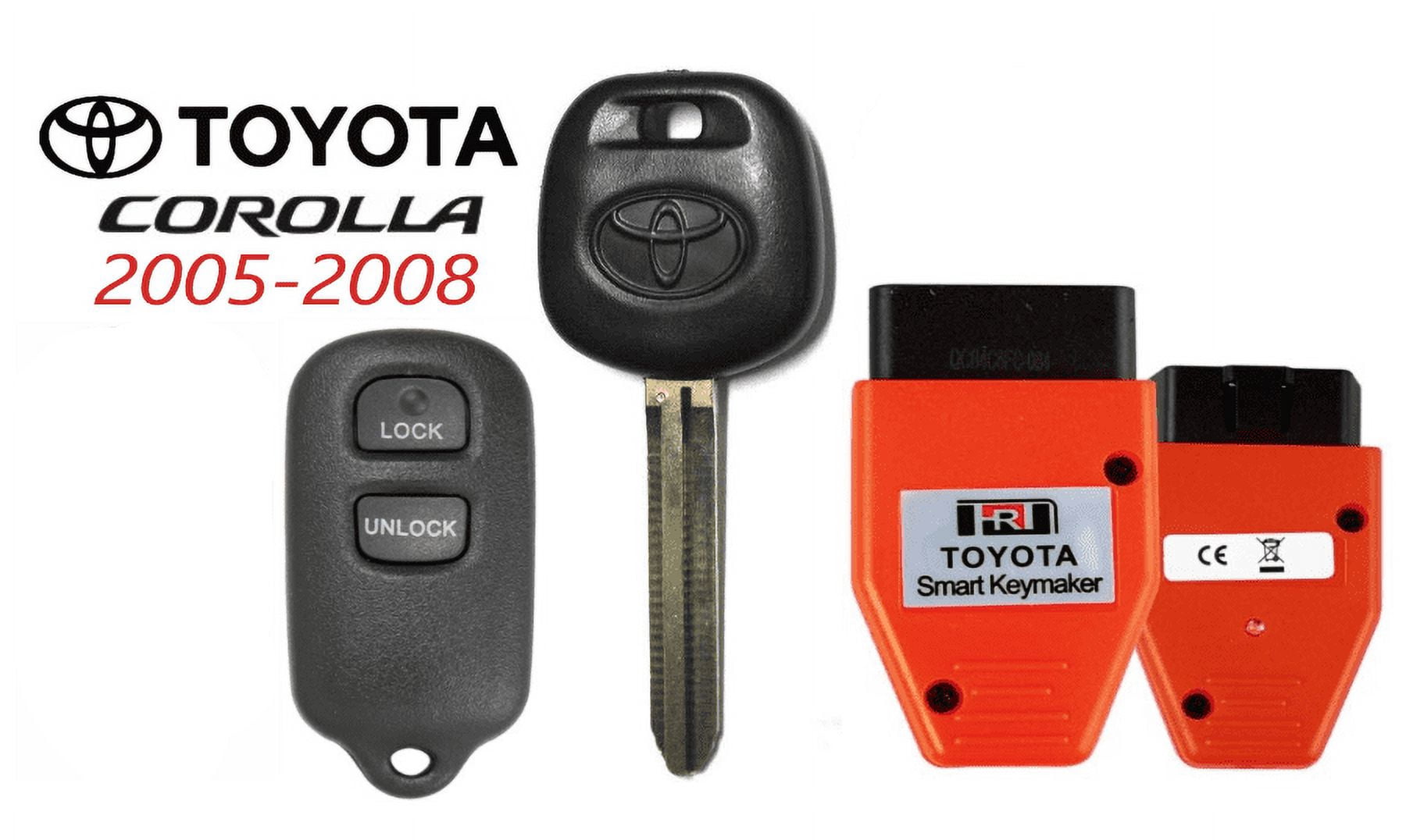
Toyota 44D Transponder DOT Chip Key + 3 Button Remote GQ43VT14T + Programmer VLS
Artikelnr.:
153829612
ANG 91
Price Details
Excluding Shipping & Custom charges ( Shipping and custom charges will be calculated on checkout )
*All items will import from VS
0 ratings
Schrijf een beoordeling
Op voorraad
 Geïmporteerd uit USA
QTY:
Nog slechts 12 artikelen op voorraad.
Bestel nu en ontvang het rond Donderdag, Juli 30
Beveiligde transactie
Ubuy works hard to protect your security and privacy. Our advanced payment security system ensures confidentiality by encrypting your information during transmission using AES (Advanced Encryption Standards) and SSL (Secure Socket Layer) protocols. Your payment details are 100% secure as we do not share your payment details with third party sellers.
Onze beste bezorgdiensten


Smart and efficient. Program a transponder key in about 20 seconds! No 30-minute wait, and no pin codes.

Spoedbestelling

Gratis
retourneren*

Stevig verpakt

100% Origineel product

PCI DSS Compliance

ISO 27001 Certified


Productdetails
- Smart and efficient. Program a transponder key in about 20 seconds! No 30-minute wait, and no pin codes. Just connect to the OBDII port and go. Simply the fastest way to program TOY44D keysCompatibility with the following: 2005-2008 Toyota Corolla 2005-2008 Pontiac Vibe 2005-2008 Toyota Matrix OE: 89742-AA030 ; FCC ID: GQ43VT14T Frequency: 315 MHz Battery: CR2032 Buttons: Lock, Unlock, Panic ; Toy44D Transponder Key Chip: 4D67 (Master) Test Key: TR47 Cross Reference: TOY44D-PT, 5910834, 89785-08020, 89785-60160Program Key Programming Instructions :To program keys when all keys have been lost:1. Using the transponder master key, switch the ignition to the “ON” position2. Insert the tool into the OBDII port. You will hear one beep. After about 3 seconds, the tool will beep 3 more times indicating that the vehicle has been placed into programming mode.3. Remove the tool and the key.4. Perform the following steps to program the keys: a. Close all doors b. Insert the first master key for 5 seconds (do not turn) c. Insert the second key for 5 seconds (do not turn) d. Insert the valet key for 5 seconds (do not turn) e. The programming mode should automatically end. If, for some reason, you need to end programming mode manually, simply insert and remove the first master key 5 times (do not turn). To program additional keys when you have one working master key:1. Using the working master key, switch the ignition to the “ON” position2. Insert the tool into the OBDII port. You will hear one beep. After about 3 seconds, the tool will beep 3 more times indicating that the vehicle has been placed into programming mode.3. Remove the tool and the key.4. Perform the following steps to program the keys: a. Close all doors b. Insert the first master key needing programming for 5 seconds (do not turn) c. Repeat step B for each key needing programming d. Insert and remove the original master key 5 times (do not turn) to end the programming Programming instructions:Start by sitting in the car with the key out of the ignition, Open the driver's door. (step 2 and 3 have to be done within 5 seconds)/Insert the key into the ignition and Pull it outPerform these steps within 40 seconds. The driver's door is still open.Close the driver's door and open the driver's door.Insert the key into the ignition and Pull it outInsert the key into the ignition and leave it in the ignition.Close the driver's door.Turn the ignition to the “ON” position and then to the “OFF” position.Pull out the key from the ignition.** The power door locks should lock then unlock so you are in programming mode and ready to program the remotes. If this does not happen start again**Remote programming has to be done within 40 seconds.Press both the lock and unlock buttons on the remote for about 1 and 1/2 seconds then let goPress the lock button for 2 seconds and let go. The car doors should lock and unlock. If they do then you are ready to program the next remote.Open the driver's door to end programming mode.
| Automotive key & remote type | Transponder Keys |
| Vehicle make | Toyota |
| Vehicle year | 2005, 2006, 2007, 2008 |
| Compatible cars | 2005-2008 Toyota Corolla 2005-2008 Pontiac Vibe 2005-2008 Toyota Matrix |
| Buttons | 3 |
| Items included | Transponder Key, Remote, Programmer |
| Brand | VLS |
| Vehicle fitment type | Specific |
| Frequency | 315 MHz |
| Model | 44D |
| Vehicle model | Corolla, Vibe, Matrix |
| Vehicle type | Car |
| Has written warranty | No |
| Compatibility | 2005-2008 Toyota Corolla 2005-2008 Pontiac Vibe 2005-2008 Toyota Matrix |
| Item Weight | 0.3 lbs (140 grams) |
PRODUCTBESCHRIJVING
Toyota 44D Transponder DOT Chip Key + 3 Button Remote GQ43VT14T + Programmer VLS
Dietary Supplement Disclaimer
Statements regarding dietary supplements have not been evaluated by the Food and Drug Administration and are not intended to diagnose, treat, cure, or prevent any disease or health condition.
Heeft u een vraag? Chat met ons
Vragen & Antwoorden van klanten
-
vraag:
Is this key compatible with my vehicle?
antwoord: This key is compatible with 2005-2008 Toyota Corolla, Pontiac Vibe, and Toyota Matrix. -
vraag:
How long does it take to program the key?
antwoord: You can program the transponder key in about 20 seconds. -
vraag:
Do I need any pin codes for programming?
antwoord: No, there are no pin codes required for programming this key.
VLS All Car Safety and Security Editorial Review
Geen beoordelingen van de redactie gevonden
Klantbeoordelingen en -waardering
1 klantenbeoordelingen
-
5 ster
0%
-
4 ster
100%
-
3 ster
0%
-
2 ster
0%
-
1 ster
0%
Beoordeel dit product
Deel uw mening met andere klanten
Platform Trust & Buyer Confidence

MT
Mohd
Verified buyer
“The product received very good packaging & safe…Thank You”
16 June 2026 · via Trustpilot
SJ
Shawati
Verified buyer
“Accurate delivery timing given”
16 June 2026 · via Trustpilot
YB
Youcef
Verified buyer
“Not madly expensive like I thought, and much quicker than promised.”
15 June 2026 · via Trustpilot
LM
Leila
Verified buyer
“Never dealt with Ubuy before, but everything worked out great. Seamless cross border purchasing and shipping. Thanks!”
6/7/2026 · via Trustpilot
KA
Kwame
Verified buyer
“The process was smooth, with clear communication and timelines. This was my 1st purchase and I am really impressed. I will definitely be coming back.”
12 June 2026 · via Trustpilot
Veilig Afrekenen
Global Delivery
Eenvoudig retourneren
Genuine Products
Prijs-/productgeschiedenis
Belangrijke informatie
- Beperkingen: voor producten die internationaal worden verzonden, gelieve er rekening mee te houden dat eventuele fabrieksgaranties mogelijk niet geldig zijn; ondersteuningsopties van de fabrikant zijn mogelijk niet beschikbaar; producthandleidingen, instructies en veiligheidswaarschuwingen zijn mogelijk niet in de taal van het land van bestemming; de producten (en bijbehorende materialen) zijn mogelijk niet ontworpen in overeenstemming met de normen, specificaties en etiketteringsvereisten van het land van bestemming; en de producten zijn mogelijk niet in overeenstemming met de voltage- en andere elektriciteitsstandaarden van het land van bestemming (waardoor het gebruik van een adapter of omvormer nodig is, indien van toepassing). De ontvanger is ervoor verantwoordelijk zich ervan te verzekeren dat het product rechtmatig kan worden geïmporteerd naar het land van bestemming. Bij het bestellen bij Ubuy of diens partners geldt de ontvanger als de geregistreerde invoerder en dient zich als zodanig te houden aan alle wetten en voorschriften van het land van bestemming.
- Omdat Ubuy een wereldwijde zoekmachine is, zijn niet alle producten die op Ubuy worden vermeld ook te koop. Producten zijn onderworpen aan wetgeving inzake export en handel.
ANG 91
Bestel nu en ontvang het rond Donderdag, Juli 30
Dit product is wel in mijn land verkrijgbaar. (Klik op de knop hierboven als dit artikel wel in jouw land verkrijgbaar is. Ons team zal het controleren en aanpassen.)
QTY:
Nog slechts 12 artikelen op voorraad.
Beveiligde transactie
PCI DSS compliant and ISO 27001:2022 certified, with encrypted payments and full buyer protection on every order.
Onze beste bezorgdiensten
Snelste wereldwijde bezorging
Kenmerken en voordelen
- Quick and easy key programming in just 20 seconds.
- Eliminates waiting time and complicated pin codes.
- Compatible with multiple Toyota and Pontiac models (2005-2008).
- Includes a 3-button remote with lock, unlock, and panic features.
- Utilizes OBDII port for hassle-free connection.
- Comes with detailed programming instructions for added convenience.
Ubuy Assurance
Experience worry-free shopping with 100% original products, PCI DSS-compliant payment security, ISO 27001-certified data protection, the fastest cross-border delivery, free returns *, and secure packaging on every order.