- Startpagina /
- Elektronica /
- Computer Accessories /
- Computer Accessories & Peripherals /
- Input Devices /
- Graphics Tablets /
- Wacom Intuos Small Graphics Drawing Tablet, I...
0 ratings






Artikelnr.:
7765603
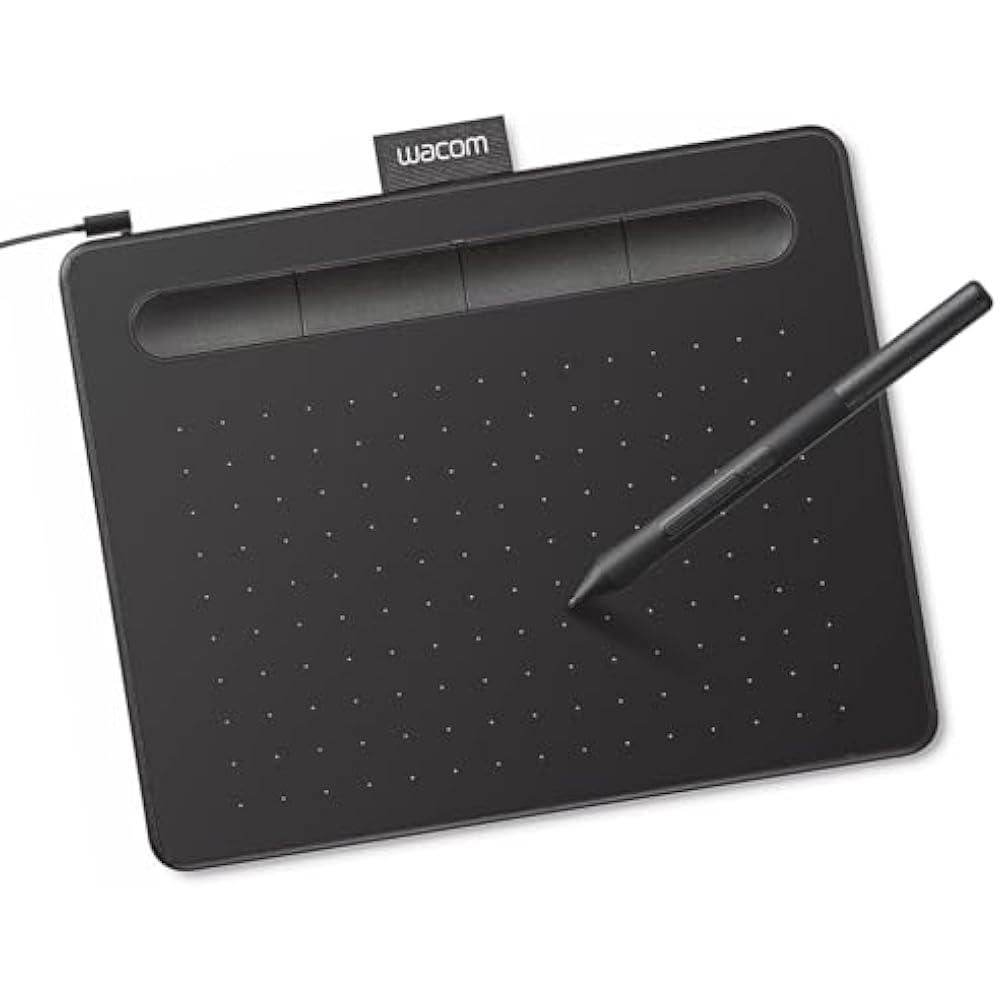
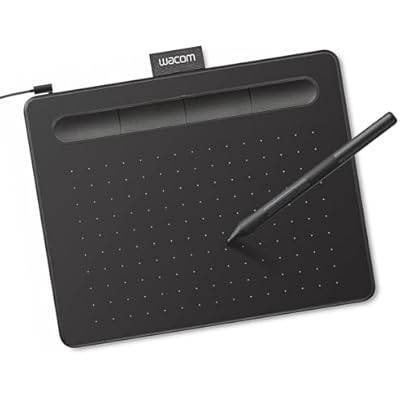
Wacom Intuos Small Graphics Drawing Tablet, Includes Training & Software; 4 Customizable ExpressKeys Compatible with Chromebook Mac Android &
Artikelnr.:
7765603
ANG 99
Price Details
Excluding Shipping & Custom charges ( Shipping and custom charges will be calculated on checkout )
*All items will import from VS
18%
Op voorraad
 Geïmporteerd uit USA
QTY:
Nog slechts 10 artikelen op voorraad.
Bestel nu en ontvang het rond Donderdag, Juli 02
Beveiligde transactie
Ubuy works hard to protect your security and privacy. Our advanced payment security system ensures confidentiality by encrypting your information during transmission using AES (Advanced Encryption Standards) and SSL (Secure Socket Layer) protocols. Your payment details are 100% secure as we do not share your payment details with third party sellers.
Onze beste bezorgdiensten


Transform the world by bringing your vision to life with a Wacom pen in your hand.

Spoedbestelling

Gratis
retourneren*

Stevig verpakt

100% Origineel product

PCI DSS Compliance

ISO 27001 Certified


Wat opvalt
Wireless Connectivity
The Bluetooth capability ensures a cord-free experience, providing greater flexibility for artists and creators to work anywhere without the hassle of tangled wires.
Customizable ExpressKeys
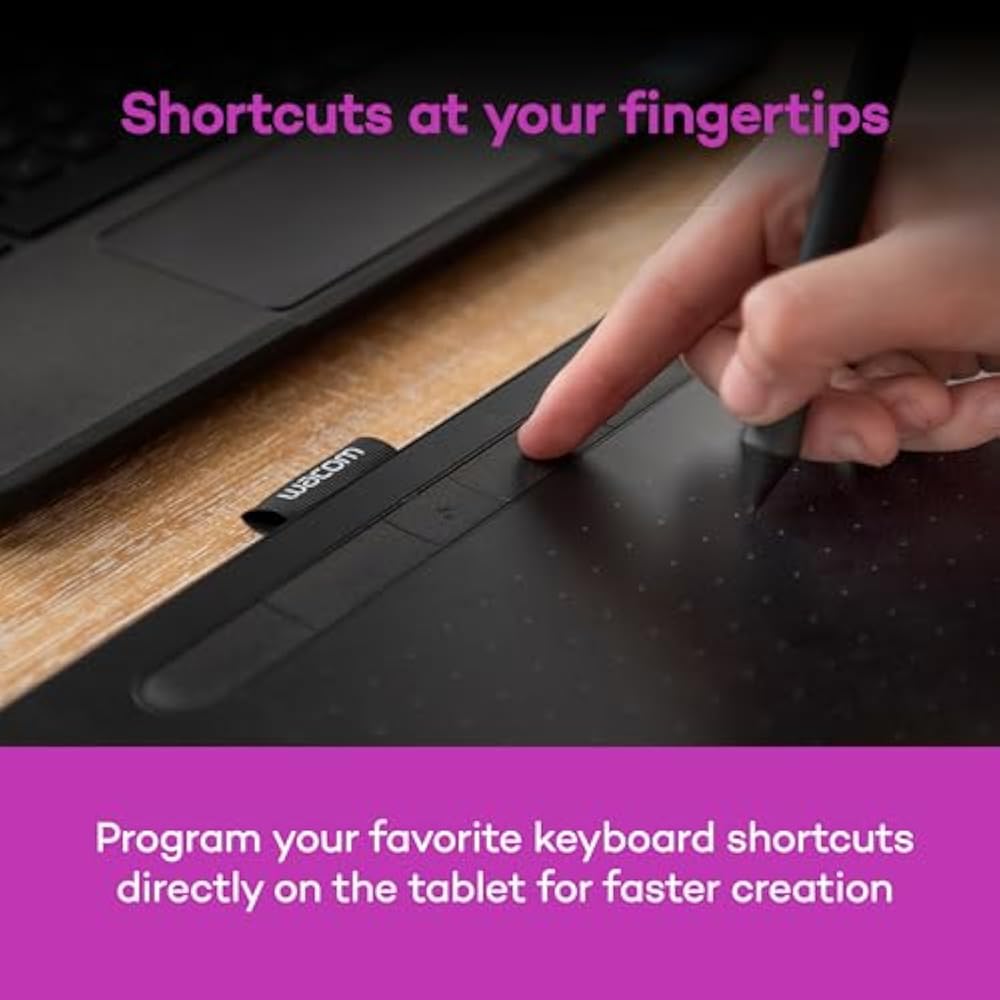
Equipped with four programmable ExpressKeys, the tablet enhances productivity by allowing users to customize shortcuts and streamline their workflow for efficiency in creative tasks.
Device Compatibility
Highly versatile, this tablet is compatible with a wide range of devices, including Chromebooks, Macs, Androids, and Windows, making it an ideal choice for students, teachers, and professionals alike.
Productdetails
- Wacom Intuos Small Graphics Drawing Tablet: Enjoy industry leading tablet performance in superior control and precision with Wacom's EMR, battery free technology that feels like pen on paper
- Works With All Software: Wacom Intuos tablet can be used in any software program to explore new facets of digital creativity; draw, paint, edit photos/videos, create designs, and mark up documents
- What the Professionals Use: Wacom's industry leading pen technology and pen to paper feeling makes it the preferred drawing tablet of professional graphic designers
- Software and Training Included: Only Wacom gives you software with every purchase. Register your Intuos tablet and gain access to some of the best creative software and Wacom's online training
- Wacom is the Global Leader in Drawing Tablet and Displays: For over 40 years in pen display and tablet market, you can trust that Wacom to help you bring your vision, ideas and creativity to life
| Brand | Wacom |
| Model Name | Intuos Small |
| Built-In Media | Wacom Intuos Small Tablet, Wacom Pen 4k, USB-A cable with L-shaped Connector, 3 extra standard nibs and nb removal tool, Quick start guide, regulation sheet |
| Target Audience | Teacher |
| Model Number | CTL4100 |
| Global Trade Identification Number | 00753218986887 |
| Manufacturer | Wacom Technology Corporation |
| UPC | 753218986887 |
| Mfr Part Number | CTL4100 |
| External Testing Certification | Não aplicavel |
| Unit Count | 1.0 Count |
| Item Type Name | Wacom Intuos Small, Without Bluetooth, black |
| Connectivity Technology | USB-A |
| Pressure Sensitivity | 4096 Levels |
| Operating System | Works with Windows, Mac OS, Android |
| Additional Features | Plug-and-play with Chromebook |
| Specific Uses For Product | Designing, Digital Art, Photo Editing |
| Compatible Devices | Windows 7, 8.1 or 10 (excluding Windows 10 S; latest service pack/build), macOS 10.11 or later (latest update) |
| Display Type | Other |
| Item Dimensions L x W | 6.3"L x 7.87"W (16 cm) |
| Active Surface Area | 6" x 3.7" |
| Color | Black |
| EU Spare Part Availability Duration | 7 Years |
| Special Feature | Plug-and-play with Chromebook |
| Package Weight | 2.53 Pound |
What's in the box
Wacom Intuos Small Tablet, Wacom Pen 4k, USB-A cable with L-shaped Connector, 3 extra standard nibs and nb removal tool, Quick start guide, regulation sheet
Voor wie is dit geschikt?

-
Digital Artists
Ideal for artists seeking a compact and portable drawing tablet for digital illustrations and designs.
-
Students
Perfect for students who need a versatile tool for taking notes or creating digital projects in various formats.
-
Teachers
Great for educators wanting to create interactive lessons and presentations through digital drawing and annotation.

-
Professional Animators
May not meet the needs of professional animators requiring advanced features and larger drawing surfaces for detailed work.
-
Gamers
Not suitable for gamers looking for input devices specifically designed for enhanced gaming experiences and responsiveness.
-
Heavy CAD Users
Not ideal for extensive CAD work where precision and larger area inputs are typically necessary for better accuracy.
PRODUCTBESCHRIJVING
Heeft u een vraag? Chat met ons
Vragen & Antwoorden van klanten
-
vraag:
What are the main features of the Wacom Intuos Small Graphics Drawing Tablet?
antwoord: The Wacom Intuos Small Graphics Drawing Tablet boasts several impressive features, including a pressure-sensitive pen that offers 4096 levels of sensitivity, which allows for precise drawing and shading. It also includes four customizable ExpressKeys, enabling users to access frequently used functions quickly. Compatible with Chromebook, Mac, and Android devices, this tablet is versatile for artists of all skill levels. Ideal for digital artists, graphic designers, and hobbyists, the Intuos enhances creativity and workflow. -
vraag:
How do the customizable ExpressKeys enhance the user experience?
antwoord: The four customizable ExpressKeys on the Wacom Intuos Small Graphics Drawing Tablet significantly enhance user experience by providing quick access to commonly used shortcuts. Users can program these keys to perform functions such as undo, redo, or switch tools, streamlining the creative process. This is particularly beneficial during time-sensitive projects or complex illustrations where efficiency is paramount. As a result, artists can maintain their creative flow without interruptions. -
vraag:
Is the Wacom Intuos compatible with my device?
antwoord: Yes, the Wacom Intuos Small Graphics Drawing Tablet is compatible with a broad range of devices, including Chromebook, Mac, and Android systems. This multi-device compatibility makes it a versatile tool for digital artists, allowing them to use it with various applications. Whether drawing on a Chromebook during a lecture or using it with a Mac for a professional project, this tablet adapts to your workflow effortlessly, making it suitable for students, professionals, and casual creators alike. -
vraag:
What software is included with the Wacom Intuos tablet?
antwoord: The Wacom Intuos Small Graphics Drawing Tablet comes with a selection of creative software to kickstart your artistic journey. This includes training resources and applications like Corel Painter Essentials and Clip Studio Paint, which cater to various artistic styles and preferences. The included software not only aids in improving skills but also provides users with tools to explore digital painting, illustration, and photo editing. These resources are perfect for beginners who are looking to learn and enhance their artistry. -
vraag:
Can I use the Wacom Intuos tablet for photo editing?
antwoord: Absolutely! The Wacom Intuos Small Graphics Drawing Tablet is an excellent choice for photo editing. Its pressure-sensitive pen allows for fine control, enabling precise adjustments and retouching. Users can easily create masks, blend colors, and apply detailed edits, making it a favored tool among photographers and graphic designers. The intuitive interface and customizable options make it compatible with popular photo editing software, enhancing overall productivity in any editing workflow. -
vraag:
How does the pen technology work on the Wacom Intuos tablet?
antwoord: The pen technology used in the Wacom Intuos Small Graphics Drawing Tablet is based on electromagnetic resonance, which detects the pen's pressure and tilt as you draw. This allows for a highly responsive experience, where the tablet captures every nuance of your art, from fine lines to smooth shading. This technology provides an authentic drawing experience comparable to traditional media, making it suitable for artists transitioning to digital art and enhancing their creative capabilities. -
vraag:
What type of artists benefit most from the Wacom Intuos tablet?
antwoord: The Wacom Intuos Small Graphics Drawing Tablet is versatile, benefiting a wide range of artists. Beginners will find the included software and training valuable for developing their skills, while intermediate and advanced artists can utilize its pressure sensitivity and customization options to explore intricate designs. Illustrators, graphic designers, and hobbyists alike will appreciate its performance and adaptability across various artistic applications. Whether creating digital drawings, illustrations, or graphic art, this tablet supports diverse creative endeavors. -
vraag:
Can I use the Wacom Intuos tablet for online tutoring or collaboration?
antwoord: Yes, the Wacom Intuos Small Graphics Drawing Tablet is an ideal tool for online tutoring or collaborative projects. Its precise drawing capabilities allow tutors to illustrate concepts live, while students can create and share their work seamlessly. This interactivity enhances remote learning experiences, making it easier for both instructors and learners to communicate ideas visually. It is especially useful for art classes, design critiques, and feedback sessions, where clarity and precision are essential. -
vraag:
What is the setup process for the Wacom Intuos tablet?
antwoord: Setting up the Wacom Intuos Small Graphics Drawing Tablet is straightforward. First, download the necessary drivers from the Wacom website based on your operating system. Once installed, connect the tablet to your device via USB, and you're ready to go! The included software often guides you through initial setups and offers helpful tutorials. This process ensures that users of all experience levels can start creating quickly, making it an accessible option for aspiring artists. -
vraag:
Where can I buy Wacom Intuos Small Graphics Drawing Tablet?
antwoord: You can conveniently purchase the Wacom Intuos Small Graphics Drawing Tablet at Ubuy. Ubuy offers a user-friendly shopping experience with a wide selection of tech products, including graphic tablets. Whether you're a student, professional artist, or hobbyist, Ubuy provides access to this versatile drawing tablet along with additional resources to help you on your creative journey.
Wacom Graphics Tablets CTL4100 Editorial Review


The Wacom Intuos Creative Pen Tablet is a mid-range drawing tablet that can be connected to computers via Bluetooth or USB. It is compatible with popular drawing applications such as Gimp and Inkscape and works with MS Paint in Windows 10. Users can rest their hand on the tablet while drawing, and the tablet comes with three extra nibs for the pen. However, the surface of the tablet wears down nibs very quickly, and with only three replacement nibs included in the pen compartment, these nibs need to be frequently replaced. Customer experience: Overall, customers find that the tablet works well for drawing and other graphic applications. However, some users have reported difficulty getting the tablet to connect to their computer, while others have found that the express keys only work with certain operating systems. Some users also noted that the nibs wear out quickly, and they wish more replacement nibs were included. On the other hand, customers appreciate the compact size of the tablet, making it easy to carry around or travel with for digital art on the go.
Klantbeoordelingen en -waardering
23708 klantenbeoordelingen
-
5 ster
76%
-
4 ster
14%
-
3 ster
5%
-
2 ster
2%
-
1 ster
3%
Beoordeel dit product
Deel uw mening met andere klanten
Voordelen
- Works well with drawing applications
- Bluetooth and USB connectivity options
- Resting hand on the tablet while drawing
- Tablet is well made with helpful buttons
Nadelen
- Nibs wear down quickly, and not enough replacement nibs included
Prijs-/productgeschiedenis
Belangrijke informatie
- Beperkingen: voor producten die internationaal worden verzonden, gelieve er rekening mee te houden dat eventuele fabrieksgaranties mogelijk niet geldig zijn; ondersteuningsopties van de fabrikant zijn mogelijk niet beschikbaar; producthandleidingen, instructies en veiligheidswaarschuwingen zijn mogelijk niet in de taal van het land van bestemming; de producten (en bijbehorende materialen) zijn mogelijk niet ontworpen in overeenstemming met de normen, specificaties en etiketteringsvereisten van het land van bestemming; en de producten zijn mogelijk niet in overeenstemming met de voltage- en andere elektriciteitsstandaarden van het land van bestemming (waardoor het gebruik van een adapter of omvormer nodig is, indien van toepassing). De ontvanger is ervoor verantwoordelijk zich ervan te verzekeren dat het product rechtmatig kan worden geïmporteerd naar het land van bestemming. Bij het bestellen bij Ubuy of diens partners geldt de ontvanger als de geregistreerde invoerder en dient zich als zodanig te houden aan alle wetten en voorschriften van het land van bestemming.
- Omdat Ubuy een wereldwijde zoekmachine is, zijn niet alle producten die op Ubuy worden vermeld ook te koop. Producten zijn onderworpen aan wetgeving inzake export en handel.
ANG 99
Bestel nu en ontvang het rond Donderdag, Juli 02
Dit product is wel in mijn land verkrijgbaar. (Klik op de knop hierboven als dit artikel wel in jouw land verkrijgbaar is. Ons team zal het controleren en aanpassen.)
QTY:
Nog slechts 10 artikelen op voorraad.
Beveiligde transactie
Ubuy works hard to protect your security and privacy. Our advanced payment security system ensures confidentiality by encrypting your information during transmission using AES (Advanced Encryption Standards) and SSL (Secure Socket Layer) protocols. Your payment details are 100% secure as we do not share your payment details with third party sellers.
Onze beste bezorgdiensten
Snelste wereldwijde bezorging
Kenmerken en voordelen
- Ideal for beginners in drawing, painting, and photo editing.
- Compatible with Mac, PC, Chromebook, and select Android devices.
- Includes useful software and online tutorials for creative guidance.
- Perfect for educational settings to enhance learning and flexibility.
- Features a compact design, making it portable and space-efficient.
- Customizable ExpressKeys for personalized workflow.