- Startpagina /
- Elektronica /
- Computeraccessoires /
- Computer Accessories & Peripherals /
- Input Devices /
- Digital Pens /
- Replacement Nib/Tip for Microsoft Surface Sli...
0 ratings



Artikelnr.:
113938772
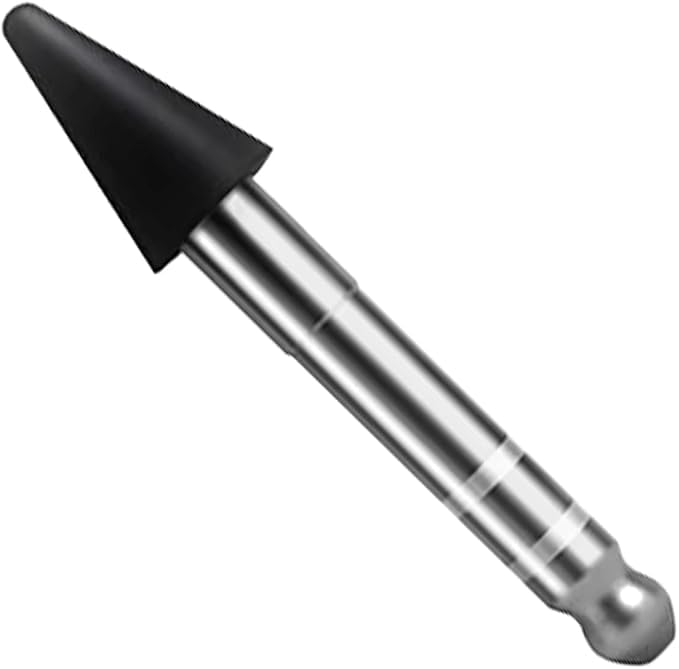
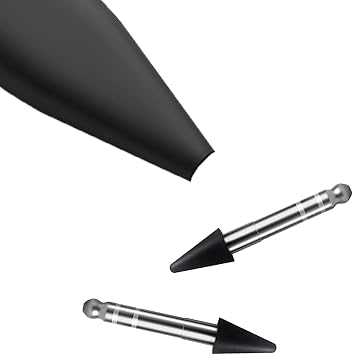
Replacement Nib/Tip for Microsoft Surface Slim Pen 2, Slim Pen 2 Nib Tip Replacement for Microsoft Surface Pro X /9/8/Surface Laptop Studio
Artikelnr.:
113938772
ANG 30
Prijsdetails
Exclusief verzend- en douanekosten ( Verzend- en douanekosten worden berekend bij het afrekenen )
*Alle artikelen worden geïmporteerd vanuit VS
0 ratings
Schrijf een beoordeling
Op voorraad
 Geïmporteerd uit USA
QTY:
Nog slechts 8 artikelen op voorraad.
Bestel nu en ontvang het rond Monday, September 28
Beveiligde transactie
Ubuy zet zich in om uw veiligheid en privacy te beschermen. Ons geavanceerde beveiligingssysteem voor betalingen zorgt voor vertrouwelijkheid door uw gegevens tijdens verzending te versleutelen met AES (Advanced Encryption Standards) en SSL (Secure Socket Layer) protocollen. Uw betalingsgegevens zijn 100% veilig, aangezien wij uw betalingsgegevens niet delen met externe verkopers.
Onze beste bezorgdiensten


High Quality - Slim Pen tip gives you accurate writing/drawing experience and has a great responsiveness and sensitivity.

Spoedbestelling

Gratis
retourneren*

Stevig verpakt

100% Origineel product

PCI DSS Compliance

ISO 27001 Certified



Wat opvalt
Precision Tip
The replacement nib offers exceptional precision, ensuring accurate lines and strokes, making it perfect for artists and designers who require detail in their work.
Durable Material
Crafted from high-quality materials, this nib guarantees longevity and performance, allowing users to create without the worry of wear and tear.
Easy Installation
Designed for hassle-free replacement, simply swap out the old tip for the new one, ensuring your Surface Slim Pen 2 is always ready for use.
Productdetails
| Brand | Alovexiong |
| Number of Packs | 1 |
| Unit Count | 1 Count |
| Manufacturer | Alovexiong |
| Compatible Devices | Laptop |
| Minimum Required Operating System Version | Windows 10 |
| Item Weight | 0.2 g |
| Color | Black |
| Enclosure Material | Plastic |
| Material | Plastic |
Voor wie is dit geschikt?

-
Digital Artists
This replacement nib enhances precision and control, ideal for sketching and drawing on the Microsoft Surface device.
-
Note Takers
Perfect for students or professionals who take digital notes, providing a smoother writing experience during lectures or meetings.
-
Surface Users
Essential for users of the Surface Slim Pen 2 needing a fresh tip for optimal performance and durability.

-
Casual Users
Not ideal for those who rarely use their pen, as it may not justify the need for a replacement tip.
PRODUCTBESCHRIJVING
Heeft u een vraag? Chat met ons
Vragen en antwoorden van klanten
-
vraag:
What is the purpose of a replacement nib for the Microsoft Surface Slim Pen 2?
antwoord: The replacement nib for the Microsoft Surface Slim Pen 2 serves to maintain optimal writing and drawing performance on your device. Over time, the original nib may wear down, resulting in decreased responsiveness or precision. By replacing it, you ensure that your pen continues to deliver smooth and accurate strokes. This is crucial for artists, note-takers, and professionals using the pen for precise tasks. -
vraag:
How do I replace the nib on the Microsoft Surface Slim Pen 2?
antwoord: To replace the nib on your Microsoft Surface Slim Pen 2, start by gently pulling out the old nib using the nib puller tool included with the pen. Once removed, insert the new replacement nib into the nib slot until you hear a click. Ensure that it is secure to maintain effective functionality. This simple process allows users to quickly refresh their pen's performance, ideal for maintaining productivity in creative or business tasks. -
vraag:
Are there different types of nibs for the Microsoft Surface Slim Pen 2?
antwoord: Yes, there are different types of nibs available for the Microsoft Surface Slim Pen 2, including standard, fine, and textured nibs. Each type offers a different feel and response, allowing users to tailor their experience based on their preferences—whether for drawing, writing, or annotating. This versatility supports various creative and professional applications, ensuring that users can pick the nib that suits their needs best. -
vraag:
How often should I replace the nib on my Surface Slim Pen 2?
antwoord: The frequency of nib replacement depends on usage. If you frequently use your pen for drawing or taking notes, you may need to replace it every few months. Signs of wear include a lack of precision or a reduced feel when writing. Regularly assessing the nib will help maintain your pen's performance, ensuring that you can continue to produce high-quality work consistently. -
vraag:
Can I use the Surface Slim Pen 2 with other Microsoft devices?
antwoord: Yes, the Surface Slim Pen 2 is designed to be compatible with various Microsoft devices that support pen input, including certain Surface laptops and tablets. This compatibility allows users to benefit from the pen's features across multiple devices, enhancing productivity whether you are working on graphics, note-taking, or document editing on different platforms. -
vraag:
Is the replacement nib easy to install?
antwoord: Yes, installing a replacement nib on the Microsoft Surface Slim Pen 2 is a straightforward process. The design includes a nib puller tool to assist you in safely removing the worn nib and easily inserting the new one. This user-friendly process is tailored for all skill levels, making it achievable for everyone, whether you're a daily user or someone who uses the pen occasionally. -
vraag:
Will using a new nib improve the performance of my Surface Slim Pen 2?
antwoord: Absolutely! Replacing a worn nib with a new one can significantly enhance the performance of your Surface Slim Pen 2. A fresh nib restores the responsiveness, accuracy, and overall feel of the pen, allowing for smoother writing and drawing experiences. This is particularly beneficial for professionals and artists who rely on precision as they navigate their digital canvases. -
vraag:
What color options are available for the Surface Slim Pen 2 replacement nib?
antwoord: The standard replacement nibs for the Microsoft Surface Slim Pen 2 typically come in black. This neutral color easily blends with the pen's design while maintaining a professional look. While options may vary, users often prefer to stick with the original color for consistency and aesthetics when replacing their nibs. -
vraag:
How do I clean my Surface Slim Pen 2 after replacing the nib?
antwoord: After replacing the nib, maintaining your Surface Slim Pen 2's cleanliness is essential for optimal performance. Use a microfiber cloth to gently wipe down the pen’s body and nib, removing any dirt or oils. This simple practice ensures that your writing and drawing experiences remain smooth, and contributes to the longevity of both your pen and the screen of your device. -
vraag:
Where can I buy a Replacement Nib/Tip for Microsoft Surface Slim Pen 2 in curacao?
antwoord: You can buy a Replacement Nib/Tip for the Microsoft Surface Slim Pen 2 from Ubuy in curacao. Ubuy provides a reliable online shopping platform where you can find authentic replacement parts for your devices, ensuring that you have what you need to keep your Surface Slim Pen 2 performing at its best.
Alovexiong Digital Pens Editorial Review
Geen beoordelingen van de redactie gevonden
Klantbeoordelingen en -waardering
7 klantenbeoordelingen
-
5 ster
34%
-
4 ster
0%
-
3 ster
0%
-
2 ster
30%
-
1 ster
36%
Beoordeel dit product
Deel uw mening met andere klanten
Voordelen
- Easy to install
- Smooth writing experience
- Good for precise work
- Durable material
- Compatible with Slim Pen 2
Nadelen
- Limited color options available.
VERTROUWEN IN HET PLATFORM & KOPERSZEKERHEID

JK
Jasmin
Geverifieerde koper
“Great products and very good service: very easy and very fast international delivery.”
9 September 2026 · via Trustpilot
AG
Anke
Geverifieerde koper
“Wonderful online shopping experience, smooth transaction from the start. Payment method works conveniently and delivery is unexpectedly fast and reliable. You go the extra mile for service. What makes this even more amazing, you deliver to Namibia. I will remain a happy Ubuy customer and will increase my purchases for sure! Thank you!”
10 September 2026 · via Trustpilot
H
Hazel
Geverifieerde koper
“Very easy to find the products what you need, and so fast delivery, that’s why I highly recommended to others costumers to used ubuy.”
10 September 2026 · via Trustpilot
O
Opaleye
Geverifieerde koper
“I received exactly what I ordered I was skeptical about your site because that was my first time to order. But the order came timely and neatly packaged. I was not disappointed. Thank you.”
11 September 2026 · via Trustpilot
AC
Adele
Geverifieerde koper
“Easy to find and order what you want on the website. Delivery is quick to the UK”
8 September 2026 · via Trustpilot
Veilig Afrekenen
Wereldwijde levering
Eenvoudig retourneren
Originele producten
Prijsgeschiedenis van het product
Belangrijke informatie
- Beperkingen: voor producten die internationaal worden verzonden, gelieve er rekening mee te houden dat eventuele fabrieksgaranties mogelijk niet geldig zijn; ondersteuningsopties van de fabrikant zijn mogelijk niet beschikbaar; producthandleidingen, instructies en veiligheidswaarschuwingen zijn mogelijk niet in de taal van het land van bestemming; de producten (en bijbehorende materialen) zijn mogelijk niet ontworpen in overeenstemming met de normen, specificaties en etiketteringsvereisten van het land van bestemming; en de producten zijn mogelijk niet in overeenstemming met de voltage- en andere elektriciteitsstandaarden van het land van bestemming (waardoor het gebruik van een adapter of omvormer nodig is, indien van toepassing). De ontvanger is ervoor verantwoordelijk zich ervan te verzekeren dat het product rechtmatig kan worden geïmporteerd naar het land van bestemming. Bij het bestellen bij Ubuy of diens partners geldt de ontvanger als de geregistreerde invoerder en dient zich als zodanig te houden aan alle wetten en voorschriften van het land van bestemming.
- Omdat Ubuy een wereldwijde zoekmachine is, zijn niet alle producten die op Ubuy worden vermeld ook te koop. Producten zijn onderworpen aan wetgeving inzake export en handel.
ANG 30
Bestel nu en ontvang het rond Monday, September 28
Dit product is wel in mijn land verkrijgbaar. (Klik op de knop hierboven als dit artikel wel in jouw land verkrijgbaar is. Ons team zal het controleren en aanpassen.)
QTY:
Nog slechts 8 artikelen op voorraad.
Beveiligde transactie
PCI DSS-compliant en ISO 27001:2022-gecertificeerd, met versleutelde betalingen en volledige kopersbescherming bij elke bestelling.
Onze beste bezorgdiensten
Snelste grensoverschrijdende levering
Kenmerken en voordelen
- Compatible exclusively with Microsoft Surface Slim Pen 2.
- Pack includes 1 replacement nib/tip in Black.
- Delivers accurate writing and drawing experience.
- Features excellent responsiveness and sensitivity.
- Easy to replace or remove without any tools.
- Manufactured in China.
Ubuy-garantie
Ervaar zorgeloos winkelen met 100% originele producten, PCI DSS-conforme betalingsbeveiliging, ISO 27001-gecertificeerde gegevensbescherming, de snelste grensoverschrijdende levering, gratis retourneren *, en veilige verpakking bij elke bestelling.