- Startpagina /
- Kantoorartikelen /
- Electronica voor kantoor /
- Scanner & Accessories /
- Computer Scanner /
- Document Scanner /
- Epson Workforce ES-400 II Color Duplex Deskto...
0 ratings


Artikelnr.:
123783749
Epson Workforce ES-400 II Color Duplex Desktop Document Scanner for PC and Mac, with Auto Document Feeder (ADF) and Image Adjustment Tools & Black
Artikelnr.:
123783749
ANG 754
Price Details
Excluding Shipping & Custom charges ( Shipping and custom charges will be calculated on checkout )
*All items will import from VS
0 ratings
Schrijf een beoordeling
Op voorraad
 Geïmporteerd uit USA
Beveiligde transactie
Ubuy works hard to protect your security and privacy. Our advanced payment security system ensures confidentiality by encrypting your information during transmission using AES (Advanced Encryption Standards) and SSL (Secure Socket Layer) protocols. Your payment details are 100% secure as we do not share your payment details with third party sellers.
Onze beste bezorgdiensten


Get organized fast with the WorkForce ES-400 II duplex desktop document scanner, capturing both sides of each sheet in one pass at speeds up to 35 ppm/70 ipm.
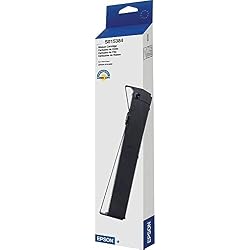
Deze bundel bevat 2 artikelen


Spoedbestelling

Gratis
retourneren*

Stevig verpakt

100% Origineel product

PCI DSS Compliance

ISO 27001 Certified


Wat opvalt
Duplex Scanning
Efficiently scans both sides of documents in one pass, saving time and enhancing productivity for busy professionals needing quick digitalization.
Auto Document Feeder
Holds up to 50 pages, allowing for uninterrupted scanning of multi-page documents, perfect for offices with high document turnover.
Image Adjustment Tools
Offers advanced tools for enhancing scan quality, ensuring clear and professional images that meet various business needs, elevating document presentation.
Productdetails
- Product 1: Get organized in a snap — scan up to 35 ppm/70 ipm (1); Single-Step Technology captures both sides in one pass
- Product 1: Quickly scan stacks of paper — robust 50-sheet Auto Document Feeder easily accommodates multiple paper types and sizes in one batch
- Product 1: Powerful software included — easy scanning with intuitive Epson ScanSmart Software (2); preview, email, upload to the cloud and more; automatic file naming saves time
- Product 1: Seamless integration with most software solutions — the included TWAIN driver allows you to easily incorporate your data into most document management software
- Product 2: Designed and engineered to meet the demands of Epson's fast, high performance impact printers
- Product 2: Long-lasting and easy to install, Epson ribbons provide longer life and better character definition than imitation supplies
- Product 2: Epson supplies guarantee Epson quality
| Scanner Type | Document |
| Connection Type | USB, Wi-Fi |
| Resolution | 300 |
| Color Depth | 24 bits_per_pixel |
| Standard Sheet Capacity | 50 |
| Optical Sensor Technology | CCD |
| Media Type | Paper |
| Brand | Epson |
| Model Name | B11B261201 |
| Minimum System Requirements | Windows 7 |
| Connectivity Technology | USB, Wi-Fi |
| Maximum Media Size | 11 x 17 inches (27.9 cm) |
| Item Weight | 11 lbs (4.99 kg) |
Voor wie is dit geschikt?

-
Small Businesses
Ideal for small businesses that require efficient, high-speed scanning to manage important documents digitally.
-
Home Offices
Perfect for home office users needing reliable, compact scanning solutions that can handle both color and black-and-white documents.
-
Students
Beneficial for students who need to digitize notes and research materials quickly and accurately for easy reference.

-
Heavy Users
Not suitable for users needing extensive daily scanning as long-term durability may be a concern.
PRODUCTBESCHRIJVING
Heeft u een vraag? Chat met ons
Vragen & Antwoorden van klanten
-
vraag:
What are the key features of the Epson Workforce ES-400 II scanner?
antwoord: The Epson Workforce ES-400 II scanner boasts numerous key features including color duplex scanning, an Auto Document Feeder (ADF) that accommodates up to 50 pages, and advanced image adjustment tools. These features enable users to efficiently scan double-sided documents and images at impressive speeds. Whether you're digitizing contracts, receipts, or multi-page reports, the ES-400 II provides excellent clarity and color accuracy, making it ideal for both home and office settings. Its compact design allows for easy placement on desks without taking up much space. -
vraag:
How does the Auto Document Feeder (ADF) work on the ES-400 II?
antwoord: The ADF on the Epson Workforce ES-400 II allows for quick and efficient scanning of multiple pages in one go. It can hold and process up to 50 sheets automatically, making it perfect for busy professionals who handle large volumes of paperwork. The ADF is particularly beneficial for digitizing multi-page documents, freeing users from the hassle of scanning each page individually. This saves time and ensures that all pages are scanned in one streamlined process, enhancing productivity in both office and home environments. -
vraag:
Can the Epson ES-400 II scan documents in different sizes?
antwoord: Yes, the Epson Workforce ES-400 II scanner can handle various document sizes, from receipts and business cards to legal-sized documents. This versatility makes it suitable for different scanning needs, allowing users to digitize a wide array of materials without needing multiple devices. Users can adapt the scanner's settings according to the size of the documents being scanned, ensuring precise and high-quality results every time, thereby catering to diverse office tasks and personal projects alike. -
vraag:
Is the Epson Workforce ES-400 II compatible with both PC and Mac?
antwoord: Absolutely, the Epson Workforce ES-400 II is designed to be compatible with both PC and Mac systems. This cross-platform functionality allows users from various operating environments to leverage its scanning capabilities without worrying about connectivity issues. Setting up the scanner is straightforward, making it an excellent choice for mixed-device offices or users who switch between PC and Mac. Compatibility ensures that a broader scope of users can access the powerful features of the ES-400 II effectively. -
vraag:
What connectivity options does the ES-400 II offer?
antwoord: The Epson Workforce ES-400 II scanner features versatile connectivity options, including USB 3.0 for high-speed connections to computers. This ensures fast data transfer and efficient scanning operations. Additionally, it supports wireless connectivity, allowing users to scan directly to cloud services or email, which enhances workflow flexibility. This dual connectivity makes the ES-400 II a practical choice for modern work environments where mobile and remote working is increasingly common. -
vraag:
What types of image adjustment tools does the ES-400 II include?
antwoord: The Epson Workforce ES-400 II comes equipped with advanced image adjustment tools that include features like automatic color detection, image cropping, and enhancement options. These tools allow users to optimize scanned images for better clarity and presentation. For instance, users can adjust brightness and contrast to improve readability, particularly for older documents that may have faded over time. This capability is crucial for creating professional-quality digital archives or presentations. -
vraag:
How fast can the Epson ES-400 II scan documents?
antwoord: The Epson Workforce ES-400 II scanner is capable of scanning up to 35 pages per minute for single-sided documents and 70 images per minute for double-sided pages in duplex mode. This high-speed performance makes it one of the fastest scanners in its class, ideal for busy environments where time efficiency is critical. Users in offices processing numerous documents daily will find that this speed significantly increases productivity and streamlines their workflow. -
vraag:
Can I use the ES-400 II for scanning photos?
antwoord: Yes, the Epson Workforce ES-400 II is suitable for scanning photos alongside regular documents. Its high-resolution scanning ensures images are captured with precision and vivid color accuracy, making it a great option for digitizing family albums or artwork. Users should consider the image adjustment tools to enhance photo quality further, ensuring that scanned images retain their original detail and color richness when archived or shared. -
vraag:
Is there a recommended software to use with the ES-400 II?
antwoord: Epson provides its own software solutions that complement the Workforce ES-400 II, such as Epson Document Capture, which allows users to manage scanned files efficiently and integrate them with cloud services. Additionally, third-party applications like Adobe Acrobat and Microsoft Office are also compatible, providing options for users to edit, store, and share their scanned files. Choosing software that matches your workflow will help you maximize the scanner’s capabilities while ensuring seamless document management. -
vraag:
Where can I buy the Epson Workforce ES-400 II scanner in curacao?
antwoord: You can purchase the Epson Workforce ES-400 II Color Duplex Desktop Document Scanner for PC and Mac, with Auto Document Feeder (ADF) and Image Adjustment Tools from Ubuy in curacao. Ubuy offers a convenient online shopping experience, with options to explore different features and specifications, ensuring you find the right model that fits your needs. Shopping with Ubuy allows for a seamless transaction, making it an ideal choice for acquiring this advanced scanner.
Epson Document Scanners Editorial Review
Geen beoordelingen van de redactie gevonden
Klantbeoordelingen en -waardering
1 klantenbeoordelingen
-
5 ster
0%
-
4 ster
100%
-
3 ster
0%
-
2 ster
0%
-
1 ster
0%
Beoordeel dit product
Deel uw mening met andere klanten
Platform Trust & Buyer Confidence

MA
Mohammad
Verified buyer
“Excellent quality and original too,when ubuy send original things I will appreciate that ,I very satisfied thank you”
23 July 2026 · via Trustpilot
CK
Chitra
Verified buyer
“The order and delivery progress was communicated very well. Package arrived within the estimated time. Products arrived as expected in good condition.”
22-Jul-26 · via Trustpilot
K
kund
Verified buyer
“Good supply of products. Safe payment methods, and shipment worldwide! Genuine products.”
23-Jul-26 · via Trustpilot
OO
Onesi
Verified buyer
“Was my first time buying a product from Ubuy, but I found it so helpful. This is reliable. Gonna place a new order!”
22 July 2026 · via Trustpilot
SJ
SAO JOHN
Verified buyer
“Ubuy is a great online platform to buy stuff. Reliable, fast delivery time and great value for money. I've been using Ubuy online shopping platform for three years now and will continue to do so.”
23 July 2026 · via Trustpilot
Veilig Afrekenen
Global Delivery
Eenvoudig retourneren
Genuine Products
Prijs-/productgeschiedenis
Belangrijke informatie
- Beperkingen: voor producten die internationaal worden verzonden, gelieve er rekening mee te houden dat eventuele fabrieksgaranties mogelijk niet geldig zijn; ondersteuningsopties van de fabrikant zijn mogelijk niet beschikbaar; producthandleidingen, instructies en veiligheidswaarschuwingen zijn mogelijk niet in de taal van het land van bestemming; de producten (en bijbehorende materialen) zijn mogelijk niet ontworpen in overeenstemming met de normen, specificaties en etiketteringsvereisten van het land van bestemming; en de producten zijn mogelijk niet in overeenstemming met de voltage- en andere elektriciteitsstandaarden van het land van bestemming (waardoor het gebruik van een adapter of omvormer nodig is, indien van toepassing). De ontvanger is ervoor verantwoordelijk zich ervan te verzekeren dat het product rechtmatig kan worden geïmporteerd naar het land van bestemming. Bij het bestellen bij Ubuy of diens partners geldt de ontvanger als de geregistreerde invoerder en dient zich als zodanig te houden aan alle wetten en voorschriften van het land van bestemming.
- Omdat Ubuy een wereldwijde zoekmachine is, zijn niet alle producten die op Ubuy worden vermeld ook te koop. Producten zijn onderworpen aan wetgeving inzake export en handel.
ANG 754
Bestel nu en ontvang het rond Zaterdag, Augustus 08
Dit product is wel in mijn land verkrijgbaar. (Klik op de knop hierboven als dit artikel wel in jouw land verkrijgbaar is. Ons team zal het controleren en aanpassen.)
QTY:
Beveiligde transactie
PCI DSS compliant and ISO 27001:2022 certified, with encrypted payments and full buyer protection on every order.
Onze beste bezorgdiensten
Snelste wereldwijde bezorging
Kenmerken en voordelen
- Fast scanning up to 35 ppm/70 ipm for efficient organization.
- Duplex technology captures both sides of documents in one pass.
- 50-sheet Auto Document Feeder accommodates various paper types and sizes.
- User-friendly Epson ScanSmart Software enhances scanning experience.
- Compatible with most document management software via TWAIN driver.
- Offers features like auto crop and dirt detection for better image quality.
Ubuy Assurance
Experience worry-free shopping with 100% original products, PCI DSS-compliant payment security, ISO 27001-certified data protection, the fastest cross-border delivery, free returns *, and secure packaging on every order.