0 ratings


Artikelnr.:
92290256
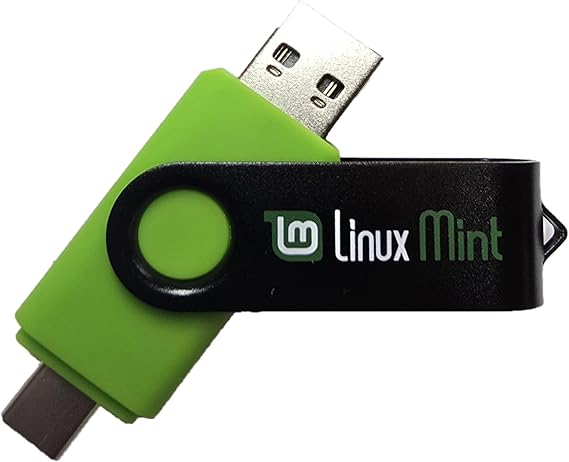
Learn How to Use Linux, Linux Mint Cinnamon 22 Bootable 8GB USB Flash Drive - Includes Boot Repair and Install Guide Now with USB Type C
Artikelnr.:
92290256
ANG 61
Prijsdetails
Exclusief verzend- en douanekosten ( Verzend- en douanekosten worden berekend bij het afrekenen )
*Alle artikelen worden geïmporteerd vanuit VS
0 ratings
Schrijf een beoordeling
Op voorraad
 Geïmporteerd uit USA
Bestel nu en ontvang het rond Donderdag, September 03
Beveiligde transactie
Ubuy zet zich in om uw veiligheid en privacy te beschermen. Ons geavanceerde beveiligingssysteem voor betalingen zorgt voor vertrouwelijkheid door uw gegevens tijdens verzending te versleutelen met AES (Advanced Encryption Standards) en SSL (Secure Socket Layer) protocollen. Uw betalingsgegevens zijn 100% veilig, aangezien wij uw betalingsgegevens niet delen met externe verkopers.
Onze beste bezorgdiensten


This 8 GB USB Flash drive allows you to try and install Linux Mint 22 alongside Windows or fully replace it, complete with support and updates!

Spoedbestelling

Gratis
retourneren*

Stevig verpakt

100% Origineel product

PCI DSS Compliance

ISO 27001 Certified



Wat opvalt
Bootable Convenience
Easily boot Linux Mint Cinnamon 22 from an 8GB USB flash drive, providing on-the-go access and installation of a powerful Linux operating system with minimal setup.
Comprehensive Guide
Includes a step-by-step boot repair and installation guide, empowering users to troubleshoot and set up Linux confidently, regardless of their prior experience with operating systems.
USB Type C Support
Designed with USB Type C compatibility, ensuring seamless connectivity with modern devices and enhancing versatility for users with various hardware options.
Productdetails
| Memory Storage Capacity | 8 GB |
| Hardware Interface | USB |
| Additional Features | LED Indicator |
| Write Speed | 20 MB/s |
| Read Speed | 20 megabytes_per_second |
| Connectivity Technology | USB |
| Flash Memory Type | USB |
| Hardware Connectivity Technology | USB Type C |
| Compatible Devices | All modern-day computers, laptops, and desktops |
| Brand | MTN TOOL |
| Manufacturer | Linux Builder |
| Model Number | 74e7848d-87e6-408e-be57-b40a48d914be |
| Color | Green |
| Special Feature | LED Indicator |
| Item Weight | 0.1 lbs (50 grams) |
Voor wie is dit geschikt?

-
Beginners to Linux
Ideal for those new to Linux who need a straightforward installation and repair guide.
-
Tech Enthusiasts
Perfect for tech-savvy users looking to experiment with Linux Mint in a portable format.
-
Students and Educators
A great resource for learners and teachers needing a practical tool for teaching Linux basics.

-
Advanced Users
Experienced users might find the installation process too basic or lacking in advanced options.
PRODUCTBESCHRIJVING
Learn How to Use Linux, Linux Mint Cinnamon 22 Bootable 8GB USB Flash Drive - Includes Boot Repair and Install Guide Now with USB Type C
Heeft u een vraag? Chat met ons
Vragen en antwoorden van klanten
-
vraag:
What is included with the Linux Mint Cinnamon 22 Bootable USB Flash Drive?
antwoord: The Linux Mint Cinnamon 22 Bootable 8GB USB Flash Drive comes preloaded with the Linux Mint operating system, designed for an intuitive user experience. It includes a detailed Boot Repair and Install Guide to help users navigate the installation process smoothly. This drive is particularly beneficial for beginners who want to explore Linux without extensive prior knowledge. With USB Type C compatibility, users can connect it to modern devices effortlessly, making it versatile for various setups. -
vraag:
Can I use the Linux Mint Cinnamon USB on different computers?
antwoord: Yes, the Linux Mint Cinnamon Bootable USB Flash Drive can be used on multiple computers. Once you plug it into a compatible USB port, you can boot any computer from the drive, provided the system's BIOS supports USB booting. This feature is ideal for users who wish to test Linux Mint on different machines or use it for troubleshooting and recovery tasks. This flexibility makes the drive a valuable tool for both personal and professional use. -
vraag:
What is Linux Mint Cinnamon, and why should I use it?
antwoord: Linux Mint Cinnamon is a popular, user-friendly Linux distribution based on Ubuntu. It features a sleek, modern interface that is reminiscent of traditional desktop environments, making it easier for new users to transition from Windows or macOS. The Cinnamon desktop offers customization options and a range of pre-installed applications, ensuring a smooth user experience. It's an excellent choice for personal computing, software development, and even light gaming, providing a robust alternative to proprietary operating systems. -
vraag:
How does the Boot Repair function work?
antwoord: The Boot Repair function included on the USB Flash Drive helps resolve boot issues that may occur when installing or using Linux Mint. This tool analyzes common problems related to the system boot process and provides a simple interface to fix these issues automatically. Users benefit from this feature when encountering boot failures or errors, thereby reducing frustration and downtime while restoring access to their systems. -
vraag:
Is the USB Flash Drive compatible with USB Type C devices?
antwoord: Yes, the Linux Mint Cinnamon 22 Bootable USB Flash Drive is designed with USB Type C connectivity, making it compatible with a wide range of modern laptops and desktop computers that use USB Type C ports. This ensures users can easily plug and play without needing additional adapters, maximizing the drive's usability across different devices. Whether you're using a new MacBook or a budget laptop, its Type C compatibility is a significant advantage. -
vraag:
Can I install other software on the USB Flash Drive?
antwoord: While the primary purpose of the Linux Mint Cinnamon USB Flash Drive is to run the Linux operating system, it is possible to install additional software after booting from the drive. However, it is essential to note that changes made to the drive may not be persistent unless you configure it with a persistent storage option. This allows you to keep your installed software and modifications across sessions, making the USB drive more functional for regular use. -
vraag:
How can I create a bootable USB drive for Linux Mint?
antwoord: To create a bootable USB drive for Linux Mint, you typically need a USB drive (like the one provided) and software such as Rufus or Etcher. However, if you're using the pre-made USB Flash Drive from this product, it is already configured and bootable. Simply plug it into your PC, restart, and set your computer to boot from USB in the BIOS settings. This process allows quick access to Linux Mint without any additional setup. -
vraag:
Is support available if I have questions while using Linux Mint?
antwoord: Yes, Linux Mint has a vibrant community and extensive online resources where users can seek help and share experiences. Forums, documentation, and tutorials are readily available to address various issues, from installation to troubleshooting. Additionally, the included install guide in the USB Flash Drive offers practical support for beginners, ensuring users can find solutions to most common queries effectively. -
vraag:
Can I run Linux Mint alongside another operating system?
antwoord: Absolutely! Linux Mint can be installed alongside other operating systems, such as Windows, creating a dual-boot setup. This allows users to choose which OS to boot into at startup. This flexibility is particularly advantageous for those who want to maintain access to their existing files and systems while exploring Linux. The provided Boot Repair tool can assist if any issues arise during the setup process, making transitions smoother. -
vraag:
Where can I buy the Linux Mint Cinnamon 22 Bootable USB Flash Drive?
antwoord: You can purchase the Learn How to Use Linux, Linux Mint Cinnamon 22 Bootable 8GB USB Flash Drive, including the Boot Repair and Install Guide, from Ubuy in curacao. Ubuy offers a reliable platform for your technology needs, ensuring you receive a quality product with the necessary support and resources to get started with Linux Mint seamlessly.
MTN TOOL USB Flash Drives 74e7848d-87e6-408e-be57-b40a48d914be Editorial Review
The *Linux Mint Cinnamon 22 Bootable 8GB USB Flash Drive* has elicited mixed responses from its users. Many customers appreciated the convenience of having a pre-made bootable USB drive; however, a significant number expressed frustration with the inadequate instruction booklet that accompanied the product. Some users felt compelled to compile their own guides or rely on external sources, which illuminated the complexities involved in the installation process—especially for those less familiar with operating systems or computer configuration. One of the highlights of the Mint distribution is its friendly Cinnamon desktop environment, which offers a learning curve for those transitioning from Windows, specifically Windows 10. Users noted the ease of installation once they navigated the boot menu, although the exact key to access this menu varied depending on the manufacturer. While some experienced seamless interaction with the software, others reported compatibility issues with specific hardware (like Bluetooth keyboards) and the potential for data loss with a permanent installation. Moreover, while some users find value in the pre-installed applications—such as Firefox, Chrome, and Libre Office—others were disheartened, especially when they encountered problems with audio settings after changing their system’s boot options. Overall, the feedback reflects a product that may serve well for seasoned computer users but could pose significant challenges for novices. As a result, the product is not universally recommended, especially for those lacking technical expertise. **
Klantbeoordelingen en -waardering
1 klantenbeoordelingen
-
5 ster
100%
-
4 ster
0%
-
3 ster
0%
-
2 ster
0%
-
1 ster
0%
Beoordeel dit product
Deel uw mening met andere klanten
Voordelen
- Convenient pre-made bootable USB drive
- Cinnamon desktop is user-friendly for Windows users
- Includes useful pre-installed applications like Firefox and Libre Office
Nadelen
- Inadequate instruction booklet; requires external resources for guidance
VERTROUWEN IN HET PLATFORM & KOPERSZEKERHEID

MA
Mohammad
Geverifieerde koper
“Excellent quality and original too,when ubuy send original things I will appreciate that ,I very satisfied thank you”
23 July 2026 · via Trustpilot
CK
Chitra
Geverifieerde koper
“The order and delivery progress was communicated very well. Package arrived within the estimated time. Products arrived as expected in good condition.”
22-Jul-26 · via Trustpilot
K
kund
Geverifieerde koper
“Good supply of products. Safe payment methods, and shipment worldwide! Genuine products.”
23-Jul-26 · via Trustpilot
OO
Onesi
Geverifieerde koper
“Was my first time buying a product from Ubuy, but I found it so helpful. This is reliable. Gonna place a new order!”
22 July 2026 · via Trustpilot
SJ
SAO JOHN
Geverifieerde koper
“Ubuy is a great online platform to buy stuff. Reliable, fast delivery time and great value for money. I've been using Ubuy online shopping platform for three years now and will continue to do so.”
23 July 2026 · via Trustpilot
Veilig Afrekenen
Wereldwijde levering
Eenvoudig retourneren
Originele producten
Prijsgeschiedenis van het product
Belangrijke informatie
- Beperkingen: voor producten die internationaal worden verzonden, gelieve er rekening mee te houden dat eventuele fabrieksgaranties mogelijk niet geldig zijn; ondersteuningsopties van de fabrikant zijn mogelijk niet beschikbaar; producthandleidingen, instructies en veiligheidswaarschuwingen zijn mogelijk niet in de taal van het land van bestemming; de producten (en bijbehorende materialen) zijn mogelijk niet ontworpen in overeenstemming met de normen, specificaties en etiketteringsvereisten van het land van bestemming; en de producten zijn mogelijk niet in overeenstemming met de voltage- en andere elektriciteitsstandaarden van het land van bestemming (waardoor het gebruik van een adapter of omvormer nodig is, indien van toepassing). De ontvanger is ervoor verantwoordelijk zich ervan te verzekeren dat het product rechtmatig kan worden geïmporteerd naar het land van bestemming. Bij het bestellen bij Ubuy of diens partners geldt de ontvanger als de geregistreerde invoerder en dient zich als zodanig te houden aan alle wetten en voorschriften van het land van bestemming.
- Omdat Ubuy een wereldwijde zoekmachine is, zijn niet alle producten die op Ubuy worden vermeld ook te koop. Producten zijn onderworpen aan wetgeving inzake export en handel.
ANG 61
Bestel nu en ontvang het rond Donderdag, September 03
Dit product is wel in mijn land verkrijgbaar. (Klik op de knop hierboven als dit artikel wel in jouw land verkrijgbaar is. Ons team zal het controleren en aanpassen.)
QTY:
Beveiligde transactie
PCI DSS-compliant en ISO 27001:2022-gecertificeerd, met versleutelde betalingen en volledige kopersbescherming bij elke bestelling.
Onze beste bezorgdiensten
Snelste grensoverschrijdende levering
Kenmerken en voordelen
- Includes 8 GB USB flash drive preloaded with Linux Mint 22 LTS and Boot Repair.
- Run or install Linux Mint alongside your existing OS without any hassles.
- Easy installation with an included guide and 24/7 email support.
- Compatible with all modern computers, laptops, and desktops.
- Lifetime free updates, multilingual support, and essential productivity software.
- Boot repair tool included for troubleshooting and smooth setup.
Ubuy-garantie
Ervaar zorgeloos winkelen met 100% originele producten, PCI DSS-conforme betalingsbeveiliging, ISO 27001-gecertificeerde gegevensbescherming, de snelste grensoverschrijdende levering, gratis retourneren *, en veilige verpakking bij elke bestelling.