- Startpagina /
- Elektronica /
- Computer Accessories /
- Computer Accessories & Peripherals /
- Input Devices /
- Touch Pads /
- Wireless Trackpad Multi-Touch Surface Bluetoo...
0 ratings






Artikelnr.:
147096581
Wireless Trackpad Multi-Touch Surface Bluetooth Touchpad with High Precision Navigation for Windows10/11/Desktop/Laptop/Notebook Computer PC (MG3
Artikelnr.:
147096581
ANG 119
Price Details
Excluding Shipping & Custom charges ( Shipping and custom charges will be calculated on checkout )
*All items will import from VS
Op voorraad
 Geïmporteerd uit USA
QTY:
Nog slechts 12 artikelen op voorraad.
Bestel nu en ontvang het rond Woensdag, Juni 24
Beveiligde transactie
Ubuy works hard to protect your security and privacy. Our advanced payment security system ensures confidentiality by encrypting your information during transmission using AES (Advanced Encryption Standards) and SSL (Secure Socket Layer) protocols. Your payment details are 100% secure as we do not share your payment details with third party sellers.
Onze beste bezorgdiensten


Enjoy effortless navigation with style and ease that seamlessly integrates into your workspace.

Spoedbestelling

Gratis
retourneren*

Stevig verpakt

100% Origineel product

PCI DSS Compliance

ISO 27001 Certified


Wat opvalt
High Precision
Experience exceptional control with high precision navigation, enhancing productivity and accuracy for tasks on Windows and iPadOS devices.
Multi-Touch Support
Effortlessly navigate and gesture with multi-touch capabilities, ensuring intuitive interaction and seamless multitasking across compatible devices.
Bluetooth Connectivity
Enjoy wireless convenience with Bluetooth connectivity, allowing easy pairing with desktops, laptops, and notebooks, freeing up your workspace from clutter.
Productdetails
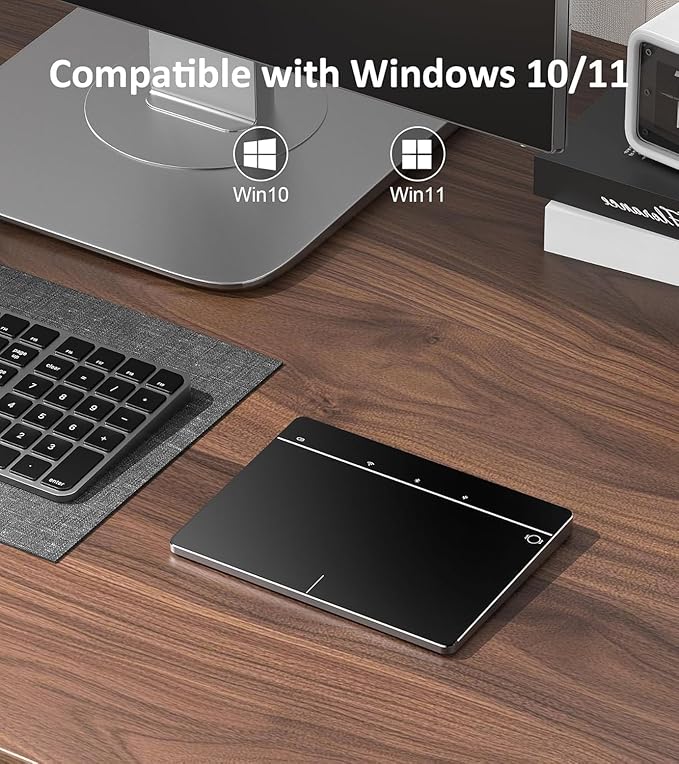
- Tempered Glass Surface -MG3 LuolaProject designs left and right touch buttons, trackpad upgraded the surface to tempered glass to be smoother, more efficient and comfortable than ever, it boasts a sturdy aluminum base and anti-slip pads on the bottom for added stability. Enjoy effortless navigation with style and ease that seamlessly integrating into your workspace(not compatible with MacOS/Linux/IOS/Andoird)
- Brand new - LuolaProject MG3 touchpad is specially designed new touch left and right buttons can perfect touch and hold with another finger to drag,With fast and sensitive responses at your fingertips, you can easily tap, scroll, pinch to zoom in on photos, and perform other functions with precision and ease. The touch surface is optimized for optimal smoothness, providing a seamless operation that surpasses typical laptop touchpads,two fingers tap once the simulate the right click of mouse
- Large-Size Trackpad with Multi-touch - LuolaProject external touchpad is designed with multi-touch controls up to 5 fingers gestures, makes it easy to select and drag, zoom in/out and scroll, activate "Cortana", switch between missions, activate mission control, minimize to desktop or activate operation center.
- Plug and Play & Stable USB-C Connection - Experience hassle-free operation with LuolaProject USB trackpad, which is designed to work right out of the box. Simply plug the USB cable into your computer's USB port, the other side USB C to the trackpad,and you're ready to go - no additional drivers necessary.If the device has exclusively has a USB-C port then you may need to use USB A-USB C adaptor, Enjoy the reliability and stability of a USB C cable connection that allows you to use the touchpad freely without any connection problems. Say goodbye to frustrating setups and hello to seamless computing
- seamless conectivity via bluetooth or 2.4g wireless – The wireless trackpad can be connected by wire, wireless 2.4g receiver and Bluetooth by toggling the switch on the side. Switch the connect button can change 2.4G/BT/USB wired connection (please note that gestures cannot be used when connecting the trackpad Bluetooth on MacOS system, and it will be recognized as a mouse by the system, so this connection method is not recommended for MacOS system);
- Wide Compatibility - LuolaProject computer touchpad is compatible with Windows10/11/IpadOS 13 or later, making it suitable for use with most PCs, laptops, and desktop computers. It supports Windows Touch Gestures setting like gesture control, as well as customizing cursor speed and scrolling direction. Stay on top of your computing with the support and compatibility you need!(Not compatible with Mac, Chrome OS, or Linux)
| Connectivity Technology | Bluetooth, USB, Wired |
| Additional Features | Wireless |
| Movement Detection | Optical |
| Hand Orientation | left and right hand |
| Compatible Devices | Personal Computer, laptop and desktop |
| Operating System | Windows10/11 |
| Number of Batteries | 1 9V batteries required. (included) |
| Hardware Platform | Laptop/Desktop, PC |
| Mouse Maximum Sensitivity | 1200 Dots per Inch (3048 cm) |
| Color | MG3 Black |
| Theme | Science |
| Item Weight | 135 Grams |
| Item Dimensions L x W | 6.34"L x 4.6"W (16.1 cm) |
| Brand | LuolaProject |
| Model Name | MG3 |
| Antenna Location | Office |
| Model Number | 179ef0ab-07f9-4744-8840-0e1cd329a8ed |
| Are Batteries Included | Yes |
| Are Batteries Required | Yes |
| Manufacturer | LuolaProject |
| Enclosure Material | Plastic Bottom, Tempered Glass Surface |
| Special Feature | Wireless |
| Movement Detection Technology | Optical |
Voor wie is dit geschikt?

-
Creative Professionals
Ideal for graphic designers and artists who need precise control and a smooth multi-touch interface for their work.
-
Remote Workers
Convenient for individuals working from home, providing a portable and comfortable navigation solution without cluttering the desk.
-
Windows/iPad Users
Perfect for users running Windows 10/11 or iPadOS, offering seamless compatibility and improved touch navigation.

-
Gamers
May not provide the responsive control needed for high-speed gaming, making traditional mice a better choice.
-
Tech-Skeptics
Not suitable for individuals uncomfortable with technology, as it requires Bluetooth setup and multi-touch gestures to navigate.
-
Budget-Conscious Buyers
Those looking for basic navigation without the advanced features may find it too expensive for their needs.
PRODUCTBESCHRIJVING
Heeft u een vraag? Chat met ons
Vragen & Antwoorden van klanten
-
vraag:
What devices are compatible with the Wireless Trackpad?
antwoord: The Wireless Trackpad is primarily designed to be compatible with Windows 8 and 10 devices. Its USB interface allows for easy connection, ensuring that laptops and desktops that run these Windows versions can interface seamlessly. Furthermore, as it utilizes a standard driver, it can work well with many third-party applications and software designed for Windows interfaces. For instance, if you're using a Windows laptop for graphic design, the trackpad's high precision can enhance your workflow significantly. -
vraag:
How do I charge the Wireless Trackpad?
antwoord: Charging the Wireless Trackpad is straightforward, as it comes with a rechargeable battery that connects via a USB cable. Simply plug it into a USB port on your computer or a compatible charger. Typically, a full charge can provide several hours of wireless use, making it perfect for extended productivity sessions. For example, if you're working late at the office, a quick charge can get you back to using the trackpad in no time. -
vraag:
Does the Wireless Trackpad support multi-touch gestures?
antwoord: Yes, the Wireless Trackpad supports multi-touch gestures, allowing for a more intuitive and efficient navigation experience. Users can perform actions such as pinch-to-zoom, swipe for scrolling, and tap-to-click with ease. This feature is particularly beneficial for those who prefer a touch-centric workflow, like graphic designers or anyone who regularly manipulates images or documents on their devices. Utilizing these gestures can significantly enhance user experience. -
vraag:
Is the surface of the Wireless Trackpad resistant to scratches?
antwoord: Yes, the Wireless Trackpad features a tempered glass surface that is designed to be resistant to scratches and wear. This ensures that the trackpad remains smooth and functional over time, even with frequent use. Whether you're working in a busy office or at home, this durability can provide peace of mind, especially for users who value aesthetics and functionality equally in their devices. -
vraag:
What is the response time of the Wireless Trackpad?
antwoord: The Wireless Trackpad is engineered for high precision, featuring a fast response time that minimizes lag during use. This is vital for tasks that require accuracy, such as gaming or graphic design. Users can expect seamless navigation and interaction, making it an optimal choice for multi-tasking environments. Whether you're switching between applications or editing high-resolution images, the responsive performance won't hinder your productivity. -
vraag:
Can I use the Wireless Trackpad for gaming?
antwoord: While the Wireless Trackpad is not specifically designed for gaming, its high precision navigation can still make it suitable for casual gaming experiences. For instance, games that rely on strategy or precision can benefit from the accurate control the trackpad provides. However, for more intense gaming sessions, a traditional mouse may offer advantages such as faster response and dedicated buttons. -
vraag:
How portable is the Wireless Trackpad?
antwoord: The Wireless Trackpad is designed to be slim and lightweight, making it highly portable. It can easily fit into a laptop bag or be carried around without adding significant bulk. This portability is ideal for individuals who travel frequently for work or school. For example, if you're a student moving between classes, this trackpad can provide a great touch interface without the hassle of dealing with cords. -
vraag:
What are the key features of the Wireless Trackpad?
antwoord: Key features of the Wireless Trackpad include a slim design, tempered glass surface, multi-touch functionality, and high precision navigation. Its rechargeable battery adds convenience, eliminating the need for constant replacement. These features make it suitable for both professional and casual use, catering to users who require efficiency and style in their tech accessories. Whether in creative industries or business settings, these specifications support productivity. -
vraag:
How does the Wireless Trackpad compare to a traditional mouse?
antwoord: The Wireless Trackpad offers a different user experience compared to a traditional mouse. While a mouse provides precise control for tasks like gaming or graphic design, the trackpad allows for seamless multi-touch gestures and a more fluid navigation experience. This can be advantageous in creative scenarios where gesture support is beneficial. For users who multitask frequently, the trackpad's gestures can enhance workflow efficiency. -
vraag:
Where can I buy the Wireless Trackpad?
antwoord: You can purchase the Wireless Trackpad from Ubuy, curacao's online marketplace renowned for its wide selection of tech gadgets. Ubuy offers convenient delivery options and a user-friendly shopping experience, making it your go-to platform for acquiring quality electronic devices like this wireless trackpad.
LuolaProject Touch Pads 179ef0ab-07f9-4744-8840-0e1cd329a8ed Editorial Review


The Wireless Trackpad Multi-Touch Surface garners a mixed reception from users, highlighted by both strengths and shortcomings. On the positive side, many customers appreciate the build quality and design, noting its aluminum base and comfortable surface that enhances fluidity and ease of use. The trackpad’s versatility in connectivity—offering both Bluetooth and a 2.4GHz USB dongle—and its compact size make it an appealing option, especially for users with space Constraints. Several reviewers praised its battery life, which outlasted expectations, and the smooth operation of multi-touch gestures. However, not all feedback is favorable. Some users experienced inConsistency in the responsiveness of the input recognition, leading to frustration, particularly in operations involving the iPad. While one user enjoyed the haptic feedback as an intuitive touch for confirming inputs, others found it unnecessary and potentially distracting, expressing a desire for customizable settings to disable specific functions, including the haptic feedback and physical buttons. Overall, while the trackpad's aesthetic and Construction impress, usability issues, particularly under certain conditions, have led to a divided user experience. ###
Klantbeoordelingen en -waardering
16 klantenbeoordelingen
-
5 ster
46%
-
4 ster
21%
-
3 ster
14%
-
2 ster
8%
-
1 ster
11%
Beoordeel dit product
Deel uw mening met andere klanten
Voordelen
- Sturdy and premium build quality with an aluminum base.
- Excellent battery life; efficient energy usage.
- Smooth multi-touch gesture support for both Windows and Mac.
- Versatile connectivity options (wired and wireless).
- Compact design suitable for limited workspace. ###
Nadelen
- InConsistent responsiveness for some users, particularly on iPads.
Prijs-/productgeschiedenis
Belangrijke informatie
- Beperkingen: voor producten die internationaal worden verzonden, gelieve er rekening mee te houden dat eventuele fabrieksgaranties mogelijk niet geldig zijn; ondersteuningsopties van de fabrikant zijn mogelijk niet beschikbaar; producthandleidingen, instructies en veiligheidswaarschuwingen zijn mogelijk niet in de taal van het land van bestemming; de producten (en bijbehorende materialen) zijn mogelijk niet ontworpen in overeenstemming met de normen, specificaties en etiketteringsvereisten van het land van bestemming; en de producten zijn mogelijk niet in overeenstemming met de voltage- en andere elektriciteitsstandaarden van het land van bestemming (waardoor het gebruik van een adapter of omvormer nodig is, indien van toepassing). De ontvanger is ervoor verantwoordelijk zich ervan te verzekeren dat het product rechtmatig kan worden geïmporteerd naar het land van bestemming. Bij het bestellen bij Ubuy of diens partners geldt de ontvanger als de geregistreerde invoerder en dient zich als zodanig te houden aan alle wetten en voorschriften van het land van bestemming.
- Omdat Ubuy een wereldwijde zoekmachine is, zijn niet alle producten die op Ubuy worden vermeld ook te koop. Producten zijn onderworpen aan wetgeving inzake export en handel.
ANG 119
Bestel nu en ontvang het rond Woensdag, Juni 24
Dit product is wel in mijn land verkrijgbaar. (Klik op de knop hierboven als dit artikel wel in jouw land verkrijgbaar is. Ons team zal het controleren en aanpassen.)
QTY:
Nog slechts 12 artikelen op voorraad.
Beveiligde transactie
Ubuy works hard to protect your security and privacy. Our advanced payment security system ensures confidentiality by encrypting your information during transmission using AES (Advanced Encryption Standards) and SSL (Secure Socket Layer) protocols. Your payment details are 100% secure as we do not share your payment details with third party sellers.
Onze beste bezorgdiensten
Snelste wereldwijde bezorging
Kenmerken en voordelen
- Tempered glass surface ensures smooth and comfortable navigation.
- No physical buttons design allows for perfect text selection and file dragging.
- Full-size trackpad supports multi-touch controls with up to 5 finger gestures.
- Plug and play functionality with stable USB-C, Bluetooth, and 2.4g wireless connectivity.
- Wide compatibility with Windows 8, 10, and 11, supporting various touch gestures.
- Sturdy ABS base with anti-slip pads provides added stability.